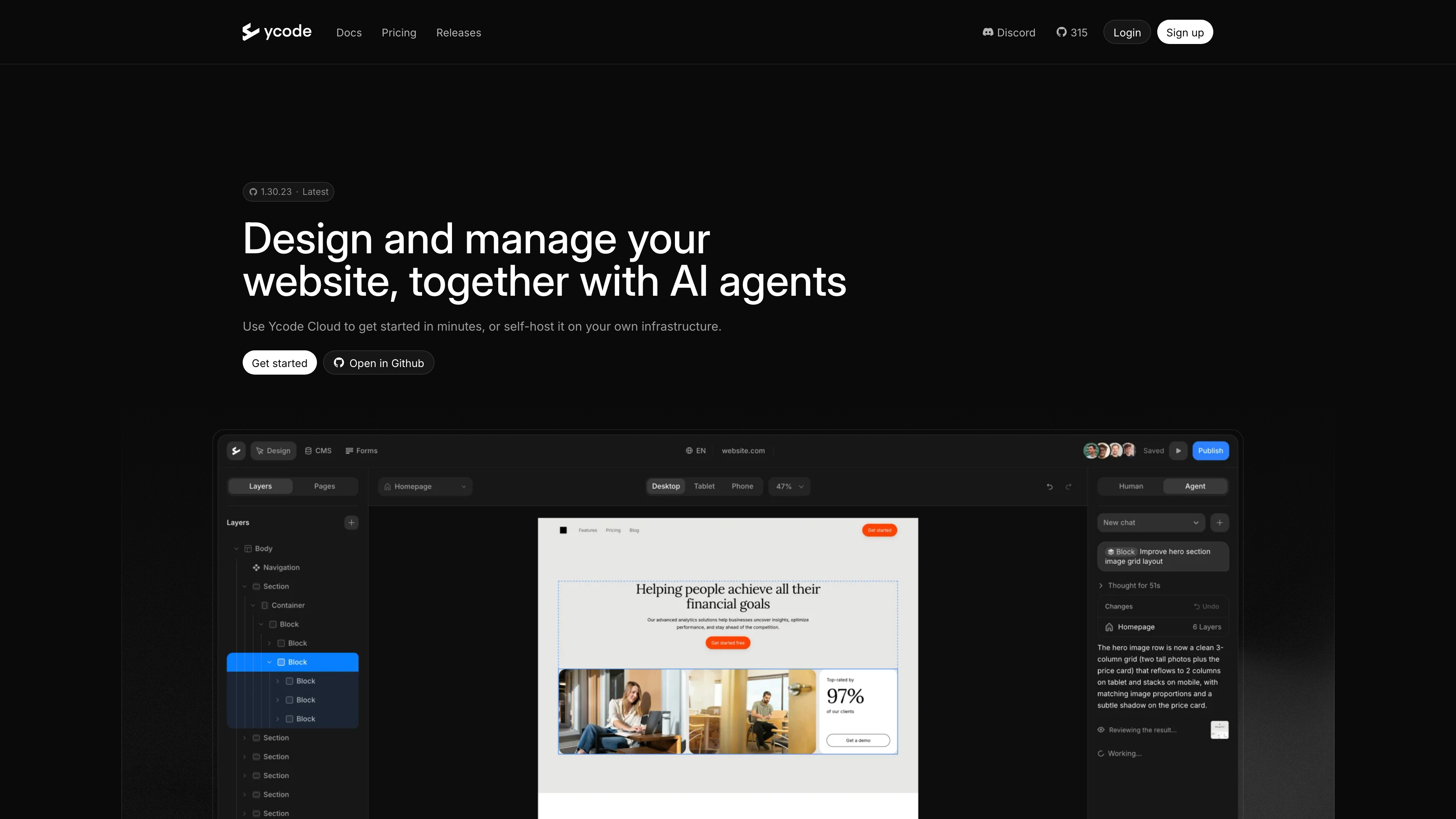
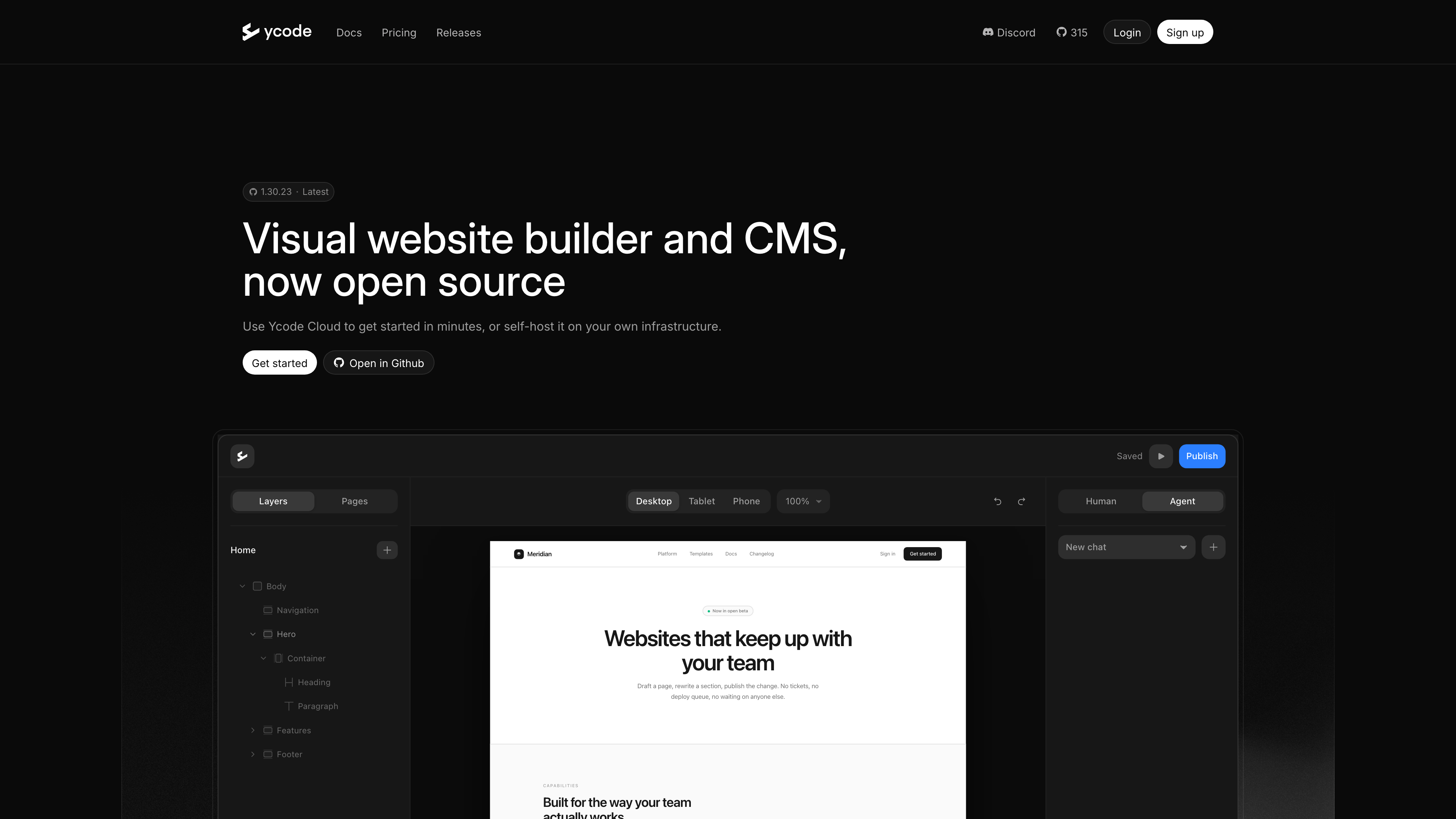
Ycode is a visual website builder plus CMS: you design pages in a drag-and-drop editor, manage content in a built-in database, and publish without writing code. What sets it apart from most competitors is that the platform itself has been open source under the MIT license since 2026: you can deploy the whole system on your own Vercel + Supabase infrastructure and self-host it for free, or use the managed Ycode Cloud — both run the same editor and feature set (source: official docs). Ycode positions itself as an alternative to Webflow and Framer, with "no lock-in" as the pitch: your code, your data, and your hosting stay under your control.
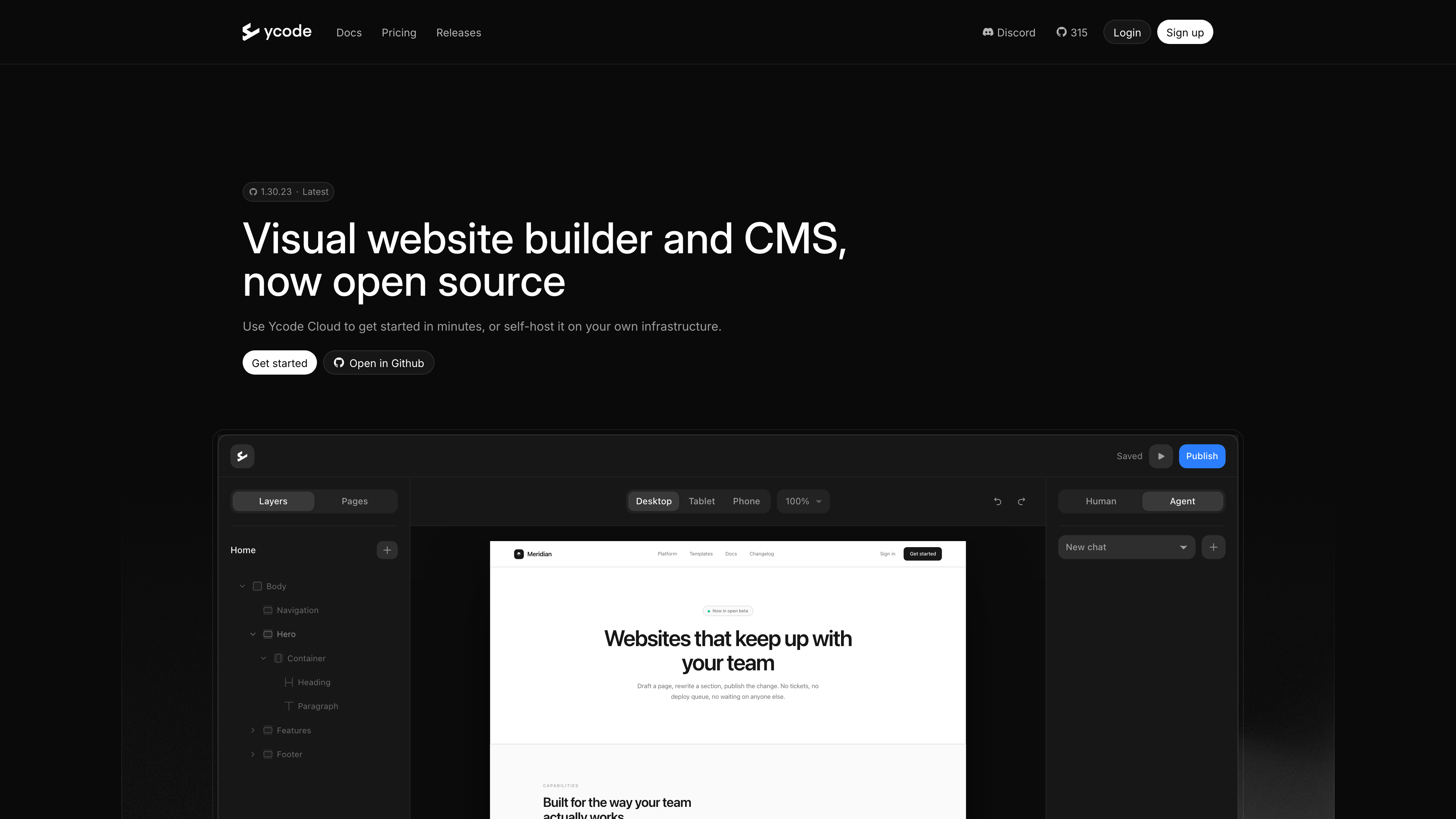
The screenshot above shows the Ycode homepage (captured 2026-09-29). The hero reads "Visual website builder and CMS, now open source" with a 1.30.23 version badge; below it is the editor interface, showing the layer tree on the left, Desktop/Tablet/Phone responsive switching at the top, and a Human / Agent toggle in the top right — the latter is the entry point to the built-in AI agent.
At a Glance
- URL: https://www.ycode.com/
- Type: Open-source visual website builder + CMS (self-hosted or managed Cloud)
- Cost: Self-hosting is free (MIT open source); Ycode Cloud is a per-project subscription at 30/month billed monthly (as of 2026-09-29, source: pricing docs)
- Sign-up: Browsing the site, docs, and template gallery requires no account; building requires one (register on ycode.com for Cloud, or create an admin account in the setup wizard when self-hosting)
- Interface language: English only (verified 2026-09-29; neither the site nor the docs offer other languages, though the product can build multilingual websites)
- Operator: Ycode, Inc., a Delaware corporation (source: Terms of Use)
Background
Ycode was founded by Ignas Rubežius, who is also co-founder and CEO of the email marketing platform MailerLite (sources: Crunchbase, MailerLite's company page on Welcome to the Jungle). The project started in 2020 (the GitHub organization was created in May 2020, and Crunchbase records him as Ycode's founder from November 2020), and launched publicly on Product Hunt on December 9, 2021 as a "no-code web app builder" — a closed-source SaaS combining visual design with a built-in database.
The product has since changed direction twice:
- AI arrived in June 2025, when Ycode AI launched to generate website drafts from prompts (source: Product Hunt).
- A full open-source pivot in 2026: the GitHub repository went public on February 24, 2026; on April 9 the project returned to Product Hunt as "Ycode Open Source — the open-source alternative to Webflow"; and on July 1 the old closed-source platform (Ycode Legacy) was permanently retired, with all active projects migrated beforehand to the rebuilt platform — pages, components, CMS data, forms, and existing subscription pricing carried over (source: official migration note). Later that month, AI Agents wired to Claude, OpenAI, Gemini, and Grok launched on Product Hunt.
So today's Ycode is an established brand on a brand-new codebase: it carries over the product thinking of the 2021 closed-source builder, but the repository is a fresh open-source rewrite, and it moves fast — roughly 20 releases shipped in the five weeks from late August to late September 2026, with 1.30.23 (released 2026-09-28) the latest as of 2026-09-29. The repo has about 315 stars and 275 forks (source: GitHub API).
Core Capabilities: Editor, CMS, and Localization
Feature-wise, Ycode lines up against tools like Webflow (source: official docs):
- Visual editor: layer tree, components (with variants and variable overrides), color variables, Google Fonts and custom fonts, responsive breakpoints, GSAP-based animation and interaction presets, rich text, sliders, lightboxes, maps, and more.
- Built-in CMS: collections with typed fields (text, rich text, number, date, asset, reference, and others), dynamic pages, and list filtering/sorting/pagination — no external database service needed; when self-hosting, the data lives in your own Supabase project.
- Multilingual sites: localization is a first-class feature, and every plan — including self-hosted and free projects — allows unlimited languages.
- Forms and SEO: form builder with submission management, SEO meta, custom sitemaps, redirects, custom code injection, password-protected pages, and similar essentials.
- Templates and migration: official starter templates at /templates (also offered in the setup wizard), plus integrations for importing from Webflow and for Airtable, Figma, Google Maps/Mapbox, and MailerLite.
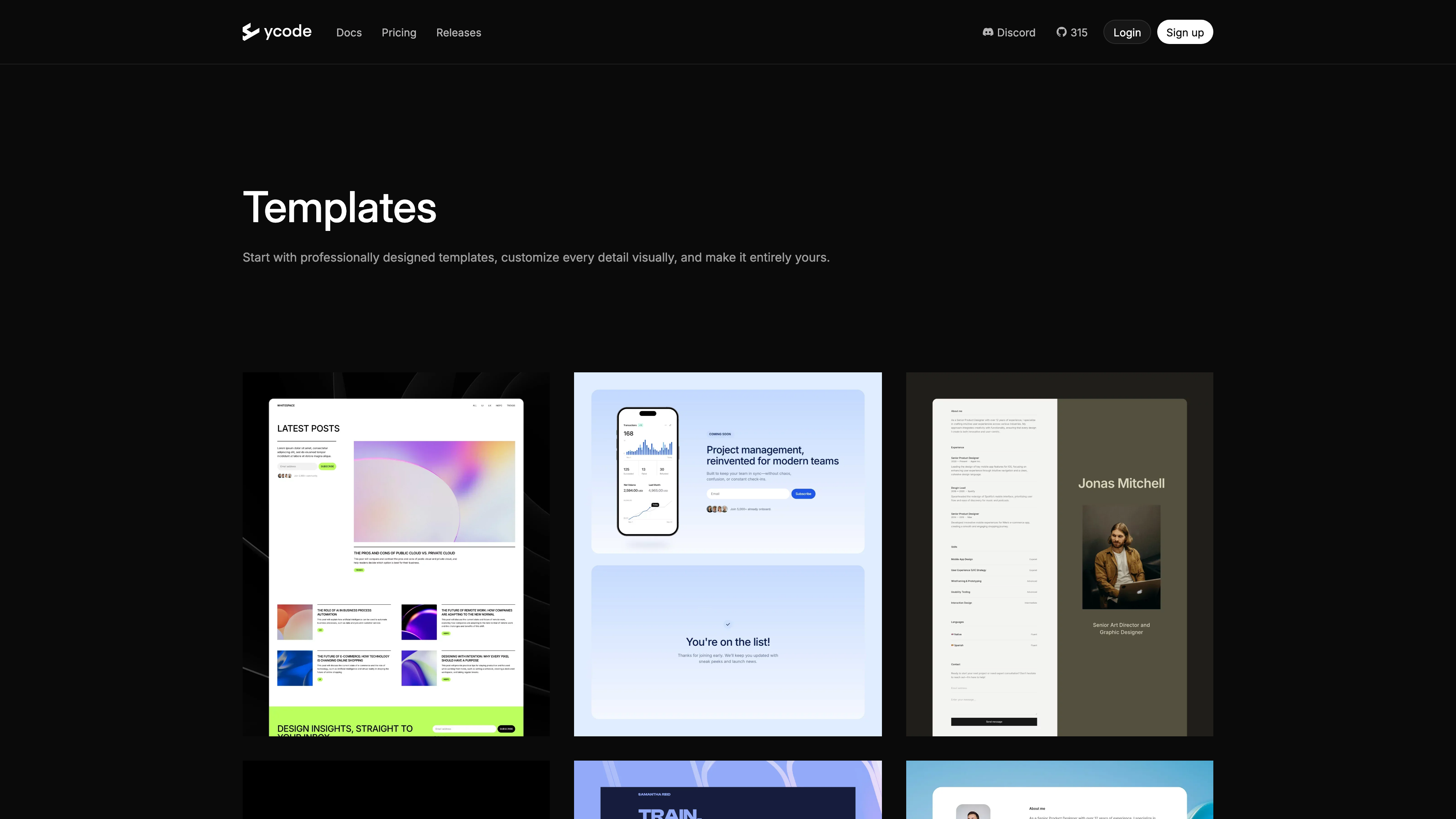
The screenshot above shows the template gallery. Ycode offers professionally designed templates — blogs, SaaS landing pages, portfolios — that you can start from and then customize visually down to the last detail. The catalog is not large, and Ycode does not publish a count.
AI Agent and MCP: Opening Site Building to AI
AI is where Ycode is investing most heavily, and its approach differs from the usual "platform sells AI credits" model:
- In-editor AI Agent: switch to the Agent panel on the editor's right side and instruct the agent in plain language to revise designs, build components, and maintain CMS content. It runs on your own API key — Anthropic, OpenAI, Google Gemini, or xAI — and Ycode charges nothing for AI usage; you pay your provider directly. Keys can be shared with the whole project or kept personal. Everything the agent does stays a draft until a human hits Publish, and each turn's changes can be reverted with one-click Undo (source: AI Agent docs).
- MCP server: every project embeds a Model Context Protocol server (about 130 tools, at feature parity with the editor), so external AI clients such as Cursor, Claude Desktop, ChatGPT, and Windsurf can connect and build directly. It supports both OAuth and URL-token authentication, and tokens can be revoked at any time.
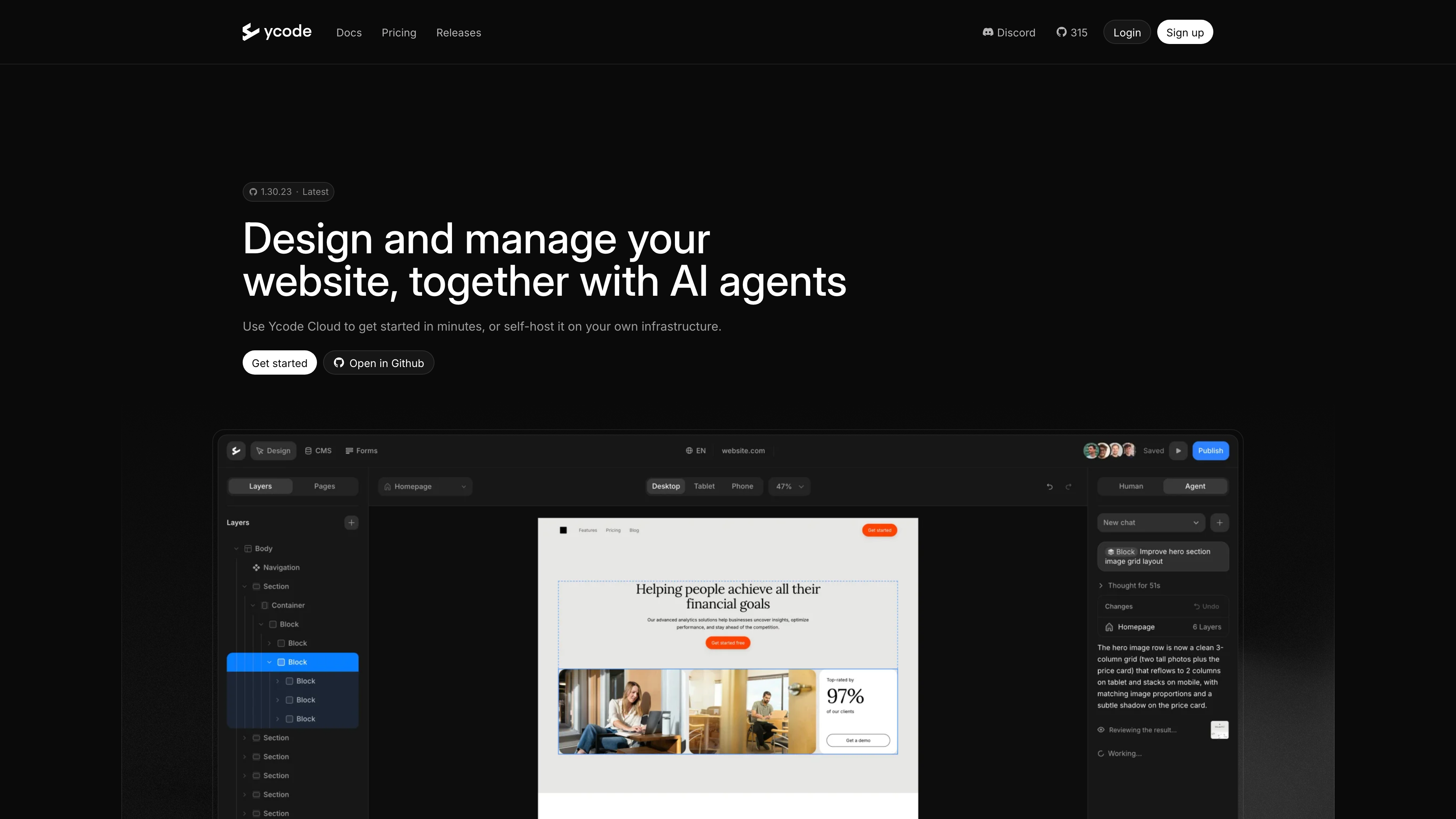
The screenshot above is Ycode's official AI agents page, showing the Agent panel at work: after being told to "improve the hero section," the agent streams its reasoning, a summary of changes (pages and layers touched), and offers Undo.
Open Interfaces: API, Static Export, and Backups
As an open-source product, Ycode provides several exits at the data and code level:
- REST API: a public v1 API covers read/write access to collections, items, forms, and submissions, authenticated with an API key (Bearer) — useful for data syncs or external front ends (source: API reference). Webhooks are available too.
- Static HTML export: export the whole site — including dynamic CMS pages — as static HTML written to a local directory, an Amazon S3 bucket, or a GitHub branch, ready for any static host; a CLI is included. It is currently self-host only, with Cloud support marked "on the way"; exports are limited to the default locale, and scroll, hover, and GSAP animations do not carry over into the static output (source: Static HTML Export docs).
- Backup & Restore: projects can be exported and imported between Cloud and self-hosted instances, so you can switch hosting models later (source: pricing docs).
Deployment and Pricing
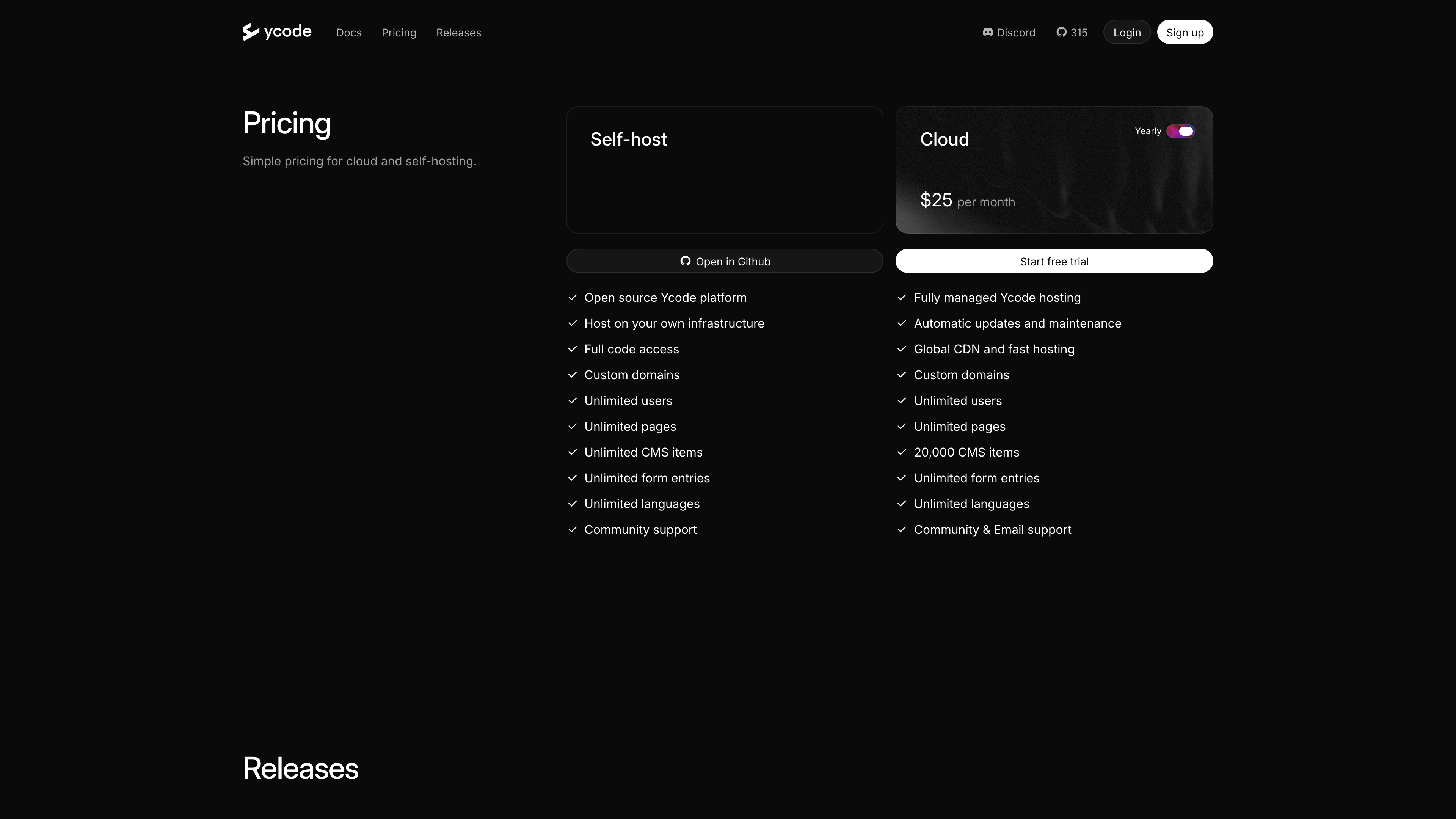
There are just two tiers (screenshot above, as of 2026-09-29; sources: homepage and pricing docs):
- Self-host: $0. Fork the GitHub repo, deploy to Vercel (or another compatible host), connect Supabase (the Cloud free tier or a self-hosted instance both work), and finish setup in the
/ycode/welcomewizard. Nothing is metered: unlimited users, pages, CMS items, form entries, and languages, with custom domains and community support (Discord/GitHub). The trade-off is that you carry the Vercel/Supabase accounts and bills yourself, and setup takes some technical comfort (Node.js 18+, environment variables). - Ycode Cloud: 30/month billed monthly, per project. Fully managed hosting with automatic updates, a global CDN, custom domains, a 20,000-CMS-item cap (everything else unmetered), community and email support, and Stripe-managed billing. New projects start on Free with the full editor so you can build first — but a never-subscribed Free project is deleted after 7 days of inactivity, and free sites live on a
*.ycode.websitesubdomain. Ycode is explicit that "Free is not a hosting plan": a production site needs a subscription.
Copyright and Content Policy
- Platform code: the GitHub repository is published under the MIT license, free to modify and redistribute.
- User content: the Terms of Use state that Ycode claims no intellectual property rights over what you submit, including your website's design and its source code; you must own or have permission for the content you publish. Prohibited content includes adult material, copyright-infringing content, hate speech or incitement to violence, phishing pages, scams (pyramid schemes, MLM, and similar), and illegal goods or services; violations can lead to account termination (source: Terms of Use).
- Privacy: the privacy policy says Ycode's data storage center is in the European Union and ISO 27001 certified; Ycode acts as Controller for customer data and as Processor for end-user data submitted through customer sites (GDPR terms). Contact: info@ycode.com (source: Privacy Policy). When self-hosting, your site's data stays entirely in your own Supabase and never touches Ycode.
Who It's For
- Teams and individuals who want a Webflow/Framer-style visual design experience but need control over code, data, and hosting;
- Long-term projects worried about platform lock-in — MIT code, your own Supabase data, and static export make leaving cheaper than with closed SaaS;
- People already using Claude, Cursor, or similar AI tools who want AI wired directly into site building, with their own keys and no platform markup;
- European businesses or data-residency-sensitive setups: self-hosting keeps data fully under your control, and Cloud data is stored in the EU.
Limitations
- The open-source codebase is young: the repo only went public in February 2026, and the release cadence is intense (20 releases in five weeks) — a sign of energy, but also of churn. The ecosystem (templates, third-party plugins, tutorials) is far smaller than Webflow's.
- Self-hosting has a real setup cost: it is not a single binary or one-click Docker — you need separate Vercel and Supabase accounts and environment-variable configuration, which remains a hurdle for non-technical users.
- Free hosting in name only: idle Free Cloud projects are deleted after 7 days, so a production site must either be subscribed or self-hosted.
- Some capabilities are still being filled in: static export does not yet support Cloud or multi-locale output, and most animations are lost in static exports; Cloud projects are capped at 20,000 CMS items.
- English-only UI and documentation.
- Legacy baggage: the old platform was shut down and rebuilt in July 2026. Ycode says active projects were migrated automatically, but a ground-up rewrite like this means long-time users should re-verify their sites.
Alternatives
- Webflow / Framer: the mainstream closed-source hosted builders Ycode explicitly positions itself against, with more mature ecosystems and templates but no control over code or data (Ycode maintains /webflow-alternative and /framer-alternative comparison pages).
- Webstudio, GrapesJS: other open-source visual site-building projects, useful as points of comparison on the self-hosted route.
- WordPress (self-hosted): comparable control over your stack, but not a visual-design-first tool — a different editing philosophy.
References
- Ycode homepage
- ycode/ycode on GitHub (MIT license)
- Ycode Docs - Introduction
- Ycode Docs - Pricing
- Ycode Docs - Ycode Legacy Shutdown
- Ycode Docs - Installation
- Ycode Docs - AI Agent
- Ycode Docs - MCP Server
- Ycode Docs - Static HTML Export
- Ycode Docs - REST API Reference
- Ycode Terms of Use / Privacy Policy
- Ycode on Product Hunt
- Ignas Rubežius on Crunchbase