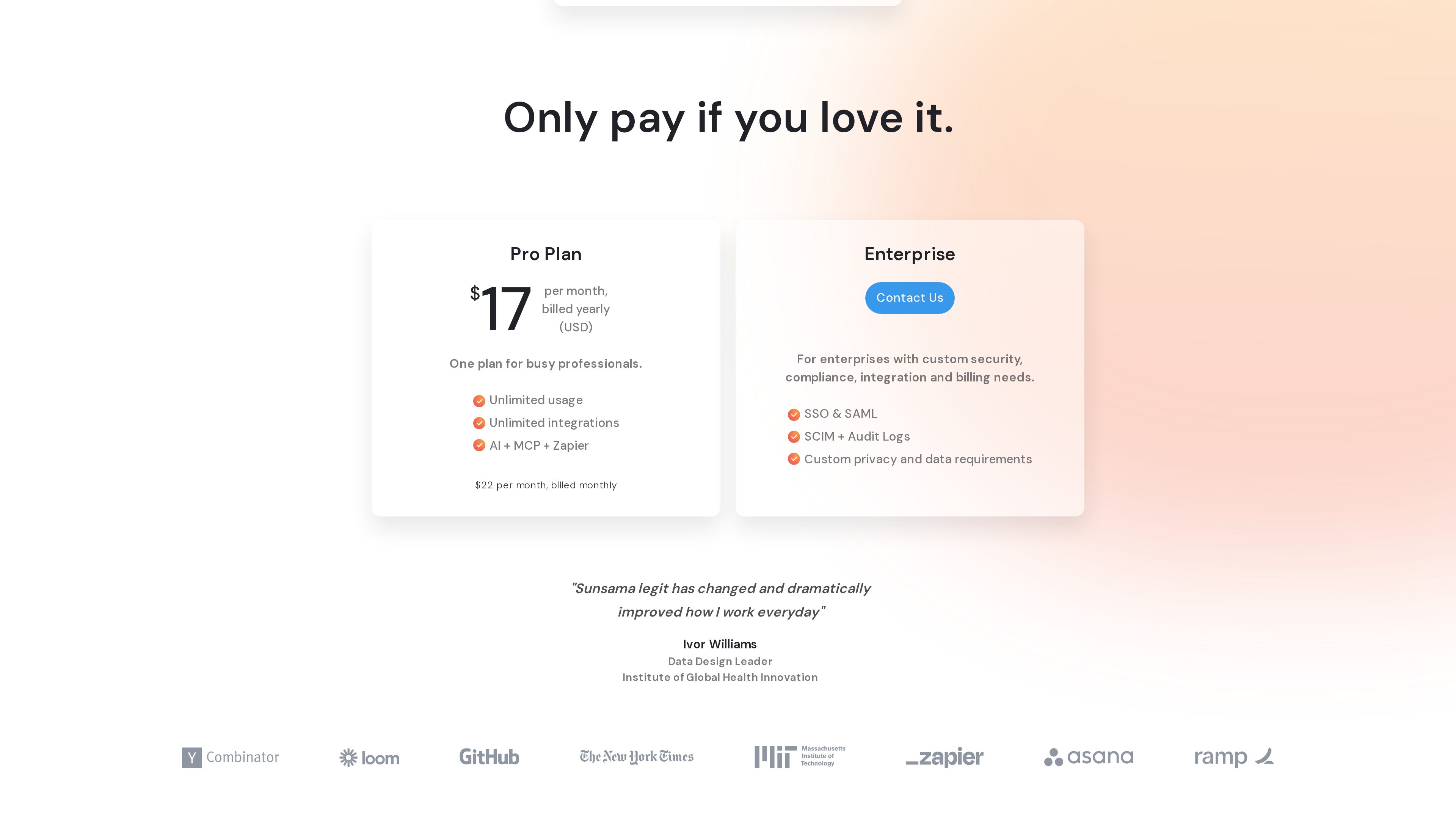
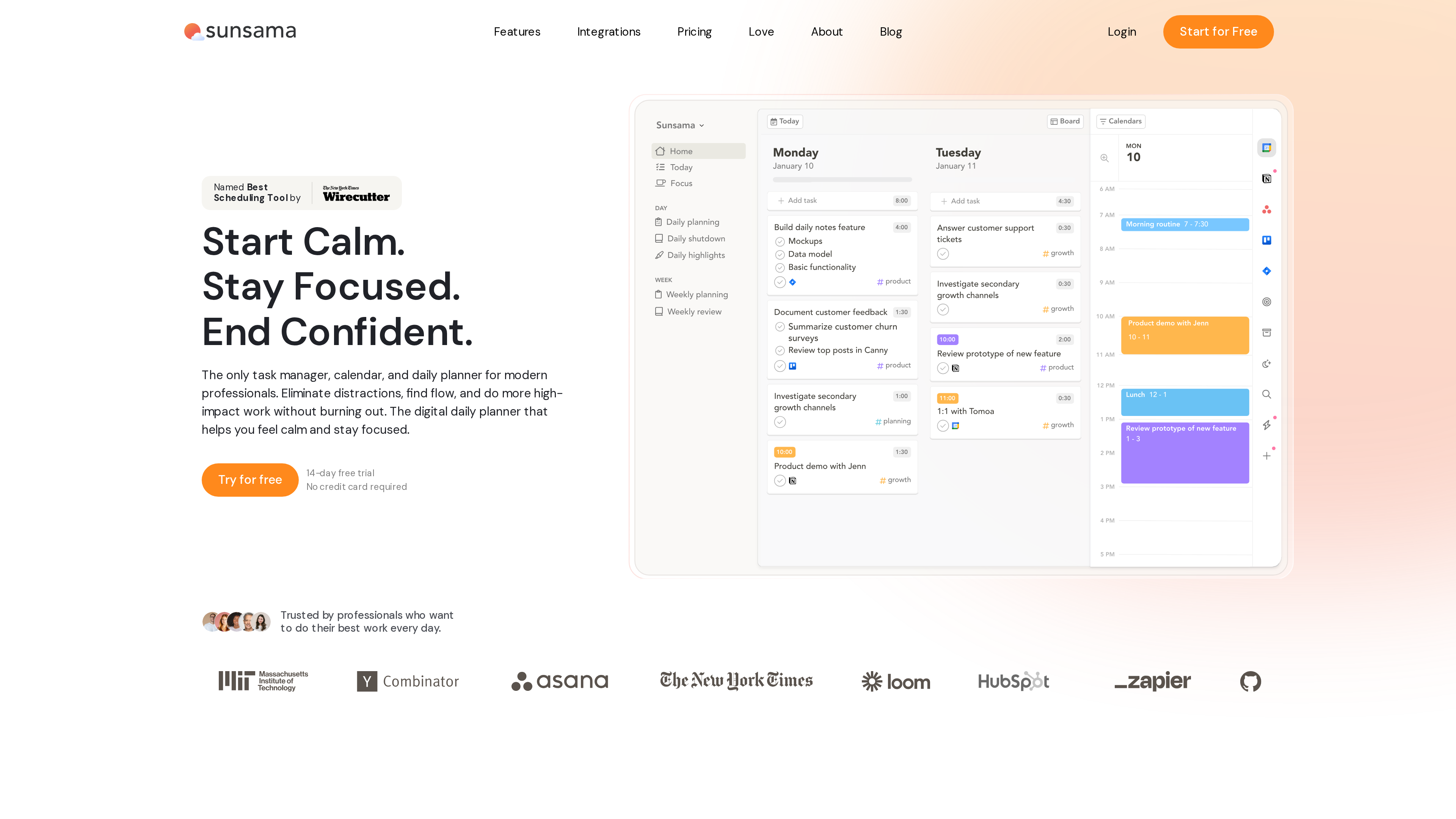
Sunsama (sunsama.com) is a daily planning tool for professionals: it merges Google, Outlook and Apple calendars with tasks scattered across Asana, Jira, Gmail, Slack and other tools into a single view, then guides you through a planning ritual each morning (or the evening before) so you can drag the day's work onto your calendar as time blocks and execute it one task at a time in focus mode. The site positions the product as "the only task manager, calendar, and daily planner for modern professionals," built around a calmer way of working — "Start Calm. Stay Focused. End Confident." (homepage, checked 2026-10-02).
What sets Sunsama apart from a plain to-do list is that its core loop is not "capture everything" but a guided daily ritual: decide what gets done today, what can wait, and when you'll stop working, deliberately keeping the workload realistic. The homepage notes that Wirecutter named Sunsama the "Best Scheduling Tool" (NYT Wirecutter review, cited as stated on Sunsama's site).
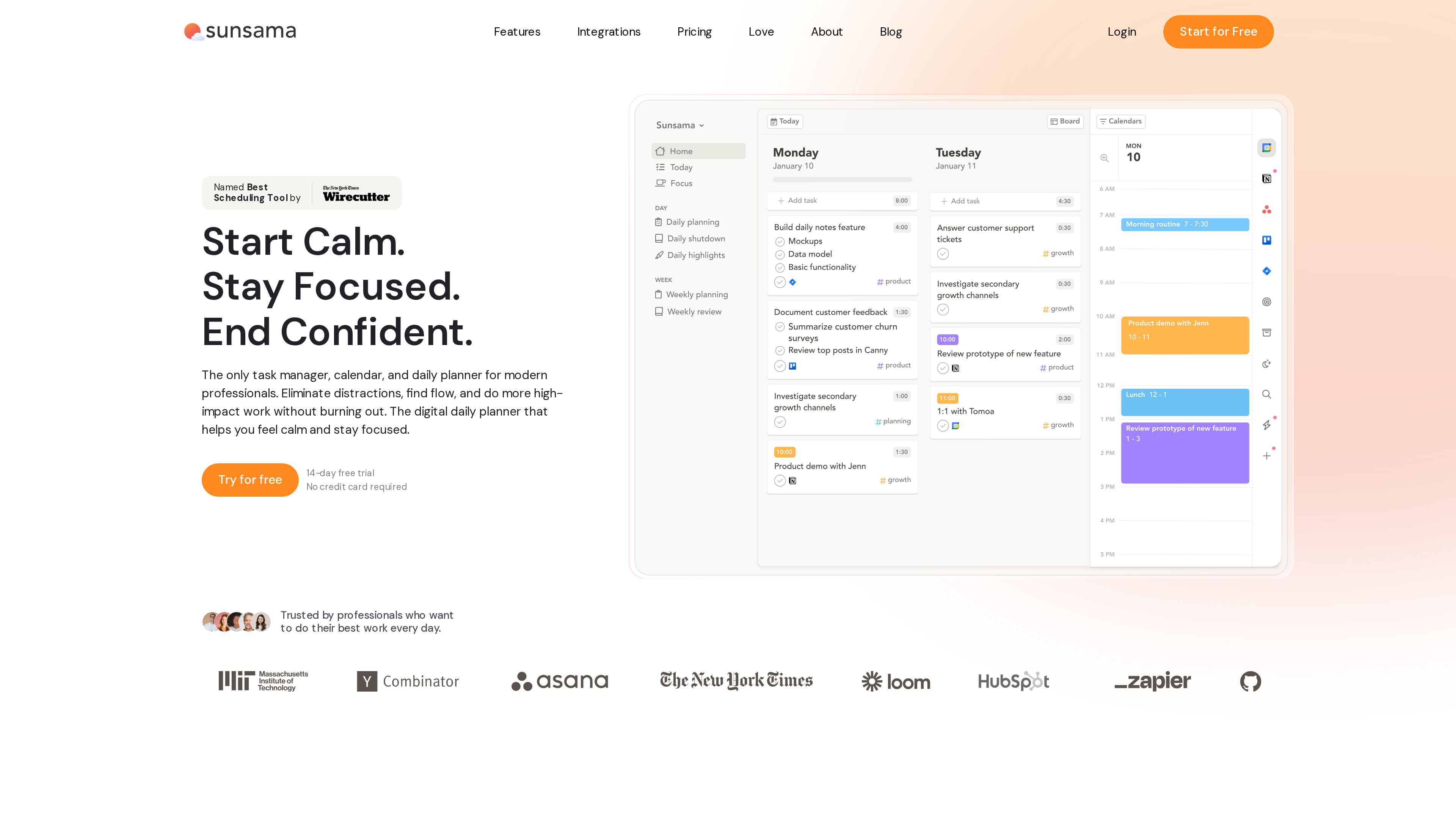
The screenshot above shows the homepage (2026-10-02): positioning copy and the Wirecutter badge on the left, and on the right a demo of the app's Home view — a sidebar with Daily planning, Daily shutdown and Weekly planning entries, a per-day task board in the middle, and a time-blocked calendar on the right.
At a Glance
| Item | Details |
|---|---|
| URL | https://www.sunsama.com/ |
| Type | Daily planner / task-calendar unification tool (SaaS) |
| Cost | No free plan; 14-day full-feature trial, no credit card required; Pro at an effective 22/month billed monthly (pricing, as of 2026-10-02) |
| Sign-up | Google, Outlook, or email account; a guided onboarding flow is mandatory before reaching the workspace (official docs) |
| Interface language | English (no official localized versions observed as of 2026-10-02) |
| Platforms | Web app; macOS, Windows and Linux desktop apps; iOS/iPadOS and Android mobile apps (officially positioned as companions to the web app) |
| Launch | First released on Product Hunt in 2018; joined Y Combinator's Winter 2019 batch (About page, YC profile) |
Background
- Founders: Sunsama was co-founded by Ashutosh Priyadarshy and Travis Meyer, who met in university and started working together in 2013. Over their first four years, on a small amount of angel funding, they built and shut down six different products; in 2018, with only months of cash left, they spent a few weeks building the day-planning tool they had always wanted for themselves and launched it on Product Hunt to strong early feedback (About page).
- Near-shutdown and pivot: In late 2018 the company had weeks of runway left. The founders emailed early users offering a choice: shut the product down, or end free plans and double the price. Users chose to pay, buying the company a few more months (About page). That episode directly shaped Sunsama's later "no free plan" pricing philosophy.
- Funding and profitability: Sunsama applied to Y Combinator in late 2018 and joined the Winter 2019 batch, then raised a $2.4M seed round; the company says it reached profitability in 2022 and has since grown without venture-capital pressure. The YC profile lists a team of about 7, based in Kailua, Hawaii (YC profile, About page).
- Legal entity: Summay, Inc. (Terms of Use, last modified 2025-07-18).
Core Capabilities
- Guided daily planning: At your chosen time each day, Sunsama walks you through a planning flow — import the day's meetings, pull in tasks from connected tools, weekly objectives or the backlog, check the predicted workload timeline to avoid overcommitting, defer what won't fit, then timebox tasks onto the calendar, order them, and set a shutdown time for the day. Plans can be shared to Slack or Teams (Daily Planning docs).
- Time blocking and calendars: Tasks drag directly onto the calendar, with two-way sync across Google, Outlook and Apple calendars, plus auto-scheduling and auto-rescheduling. Sunsama also has its own internal calendar, so time blocks don't have to pollute your personal or work calendar (account setup docs).
- Task-source integrations: The help center lists around 20 native integrations — Asana, ClickUp, GitHub, Gmail, Google Tasks, Jira, Linear, Microsoft Planner/Teams/To Do, Monday.com, Notion, Outlook, Slack, Todoist, Trello, Toggl Track, Apple Reminders and more — plus Zapier for thousands of additional apps. Emails and Slack/Teams messages can be converted into tasks, and tasks can be created by forwarding email (help center).
- Focus mode: A minimal single-task view (press F or use the sidebar) with a built-in timer and a Pomodoro tab; hovering the right edge peeks at your calendar so you don't miss meetings, and pressing A captures a new task without leaving focus. Finishing everything shows a "Done for the day" screen. A persistent Focus Bar, break reminders and a menu-bar utility round it out (Focus Mode docs).
- Daily and weekly rhythm: A daily shutdown ritual with Daily Highlights, Weekly Objectives, Weekly Planning and Weekly Review, automatic rollover of unfinished tasks, backlog plus Channels/Contexts organization, and time-use analytics (homepage, help center).
- AI and openness: Sunny, a built-in AI assistant, can create tasks, plan your day, organize the backlog and review your work via chat; a hosted MCP server (
https://api.sunsama.com/mcp, OAuth-authenticated) is documented for ChatGPT, Claude and Cursor; keyboard-driven actions include a command palette and a global quick-add shortcut (Sunny docs, MCP docs). - Enterprise compliance: The site advertises SOC2 compliance, and the Enterprise tier includes SAML/SSO, SCIM and audit logs to help pass corporate IT review (homepage, pricing).
Pricing (as of 2026-10-02)
Prices below are from the pricing page and its Pricing Manifesto:
| Tier | Price | Notes |
|---|---|---|
| Free trial | 14 days | All features, no credit card required until the trial ends |
| Pro (yearly) | $17/month effective (USD) | Unlimited usage, unlimited integrations, includes AI, MCP and Zapier |
| Pro (monthly) | $22/month (USD) | Same features as the yearly tier |
| Enterprise | Contact sales | SSO & SAML, SCIM + audit logs, custom privacy and data requirements |
Worth noting: Sunsama deliberately has no free-forever plan — the manifesto argues free plans create bad incentives (products end up selling data or shutting down) — and the company pledges no Black Friday sales, no .99 psychological pricing and no lifetime deals. Teammates are billed per seat, and you can cancel self-serve at any time, keeping access until the end of the billing cycle. Sunsama says it prices at roughly "$1 per workday" of value (pricing).
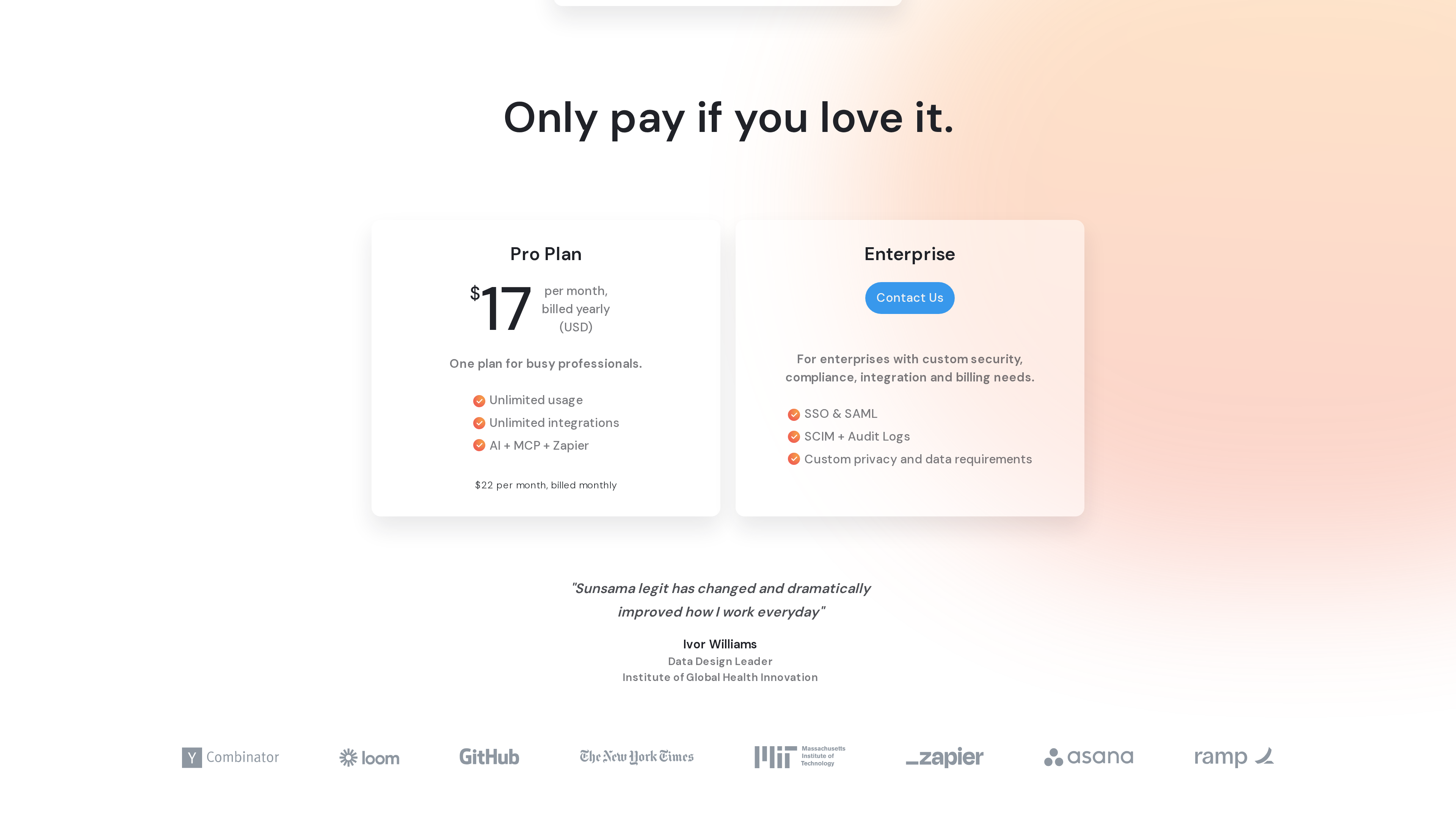
The screenshot above shows the pricing page (2026-10-02): the Pro tier with its included items (Unlimited usage, Unlimited integrations, AI + MCP + Zapier) on the left, the Enterprise tier on the right, and the 14-day no-credit-card trial entry further up the page.
Who It's For
- Knowledge workers and managers whose tasks are scattered across email, chat and project tools, and who want to consolidate them into one realistic plan each day.
- People practicing time blocking who want a "tasks as schedule" workflow, with a Pomodoro timer and focus mode to protect deep-work sessions.
- Chronic over-committers who want a guided ritual to cap workload and actually stop work on time.
- Employees who need SOC2/SSO-grade compliance before their IT department will approve a third-party tool.
Limitations
- No free plan: The trial lasts only 14 days, after which you must pay; at $22/month billed monthly it costs far more than mainstream to-do apps like Todoist.
- Mobile is a companion: Sunsama officially describes the mobile apps as companions to the web app, so the full experience depends on desktop/web — not a fit for phone-only users.
- Mandatory guided onboarding: You must complete the entire guided setup and first planning session before reaching the main workspace; there's no skip-and-explore path.
- English only: No localized interface as of 2026-10-02, which raises the barrier for non-English users.
- Calendar-centric design: If you don't live in Google/Outlook/Apple Calendar, or don't buy into the daily-planning-ritual methodology, much of the core value is lost.
- Calendar and email integrations require granting access to work content; privacy-sensitive users should review the privacy policy before connecting accounts.
References
- Sunsama homepage, pricing, About (checked 2026-10-02)
- Sunsama user manual (help center): daily planning, focus mode, MCP, account setup and more
- Y Combinator company profile: Sunsama
- Terms of Use (Summay, Inc.), Privacy Policy