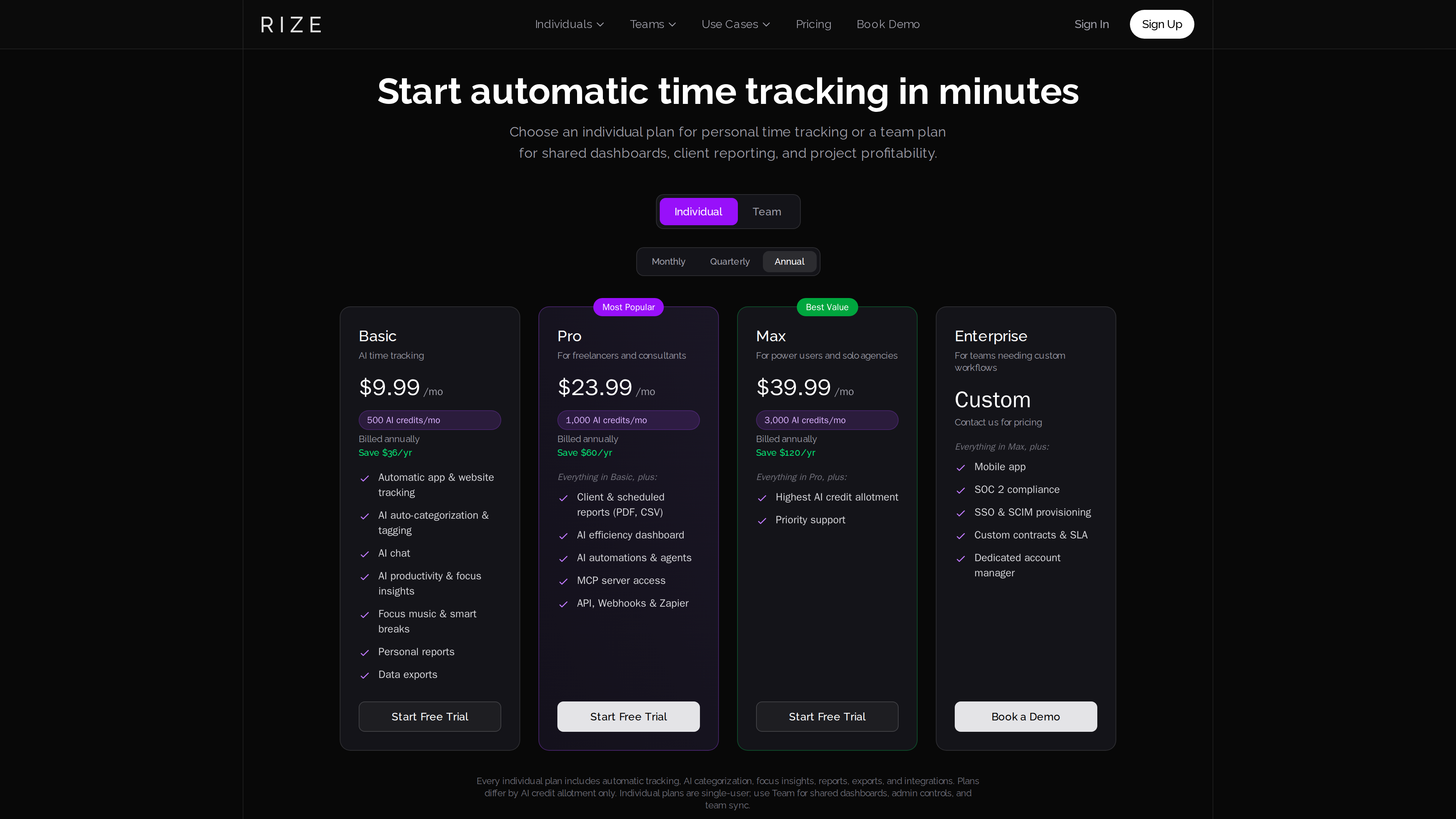
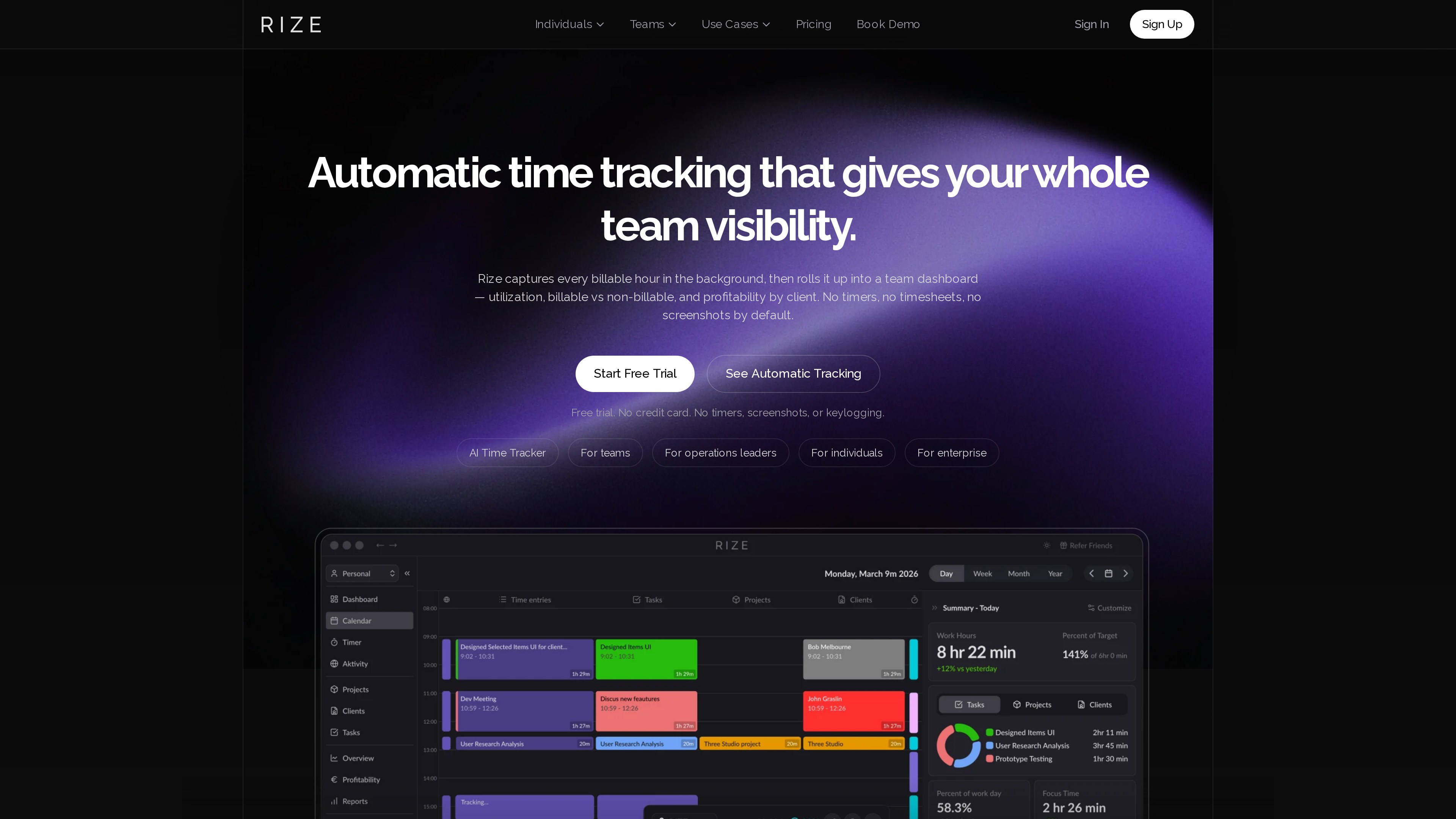
Rize (rize.io) is an automatic time-tracking tool: once installed on macOS or Windows, it continuously records the foreground app, browser tab, document and meeting time, and uses AI to assign every work session to a client, project and category — producing a timeline, focus analytics and billing reports without a single timer to start or stop (homepage, checked 2026-10-01).
Its differentiation cuts in two directions: against manual timers like Toggl and Harvest, Rize's background capture removes the billable hours lost to forgotten timers; against employee-monitoring tools like Hubstaff and Time Doctor, it explicitly does not take screenshots or log keystrokes, and leaves data control with the employee. Individuals use it to understand their focus habits; teams that bill by the hour (agencies, accounting firms, consultancies) use it to produce timesheets and profitability reports automatically.
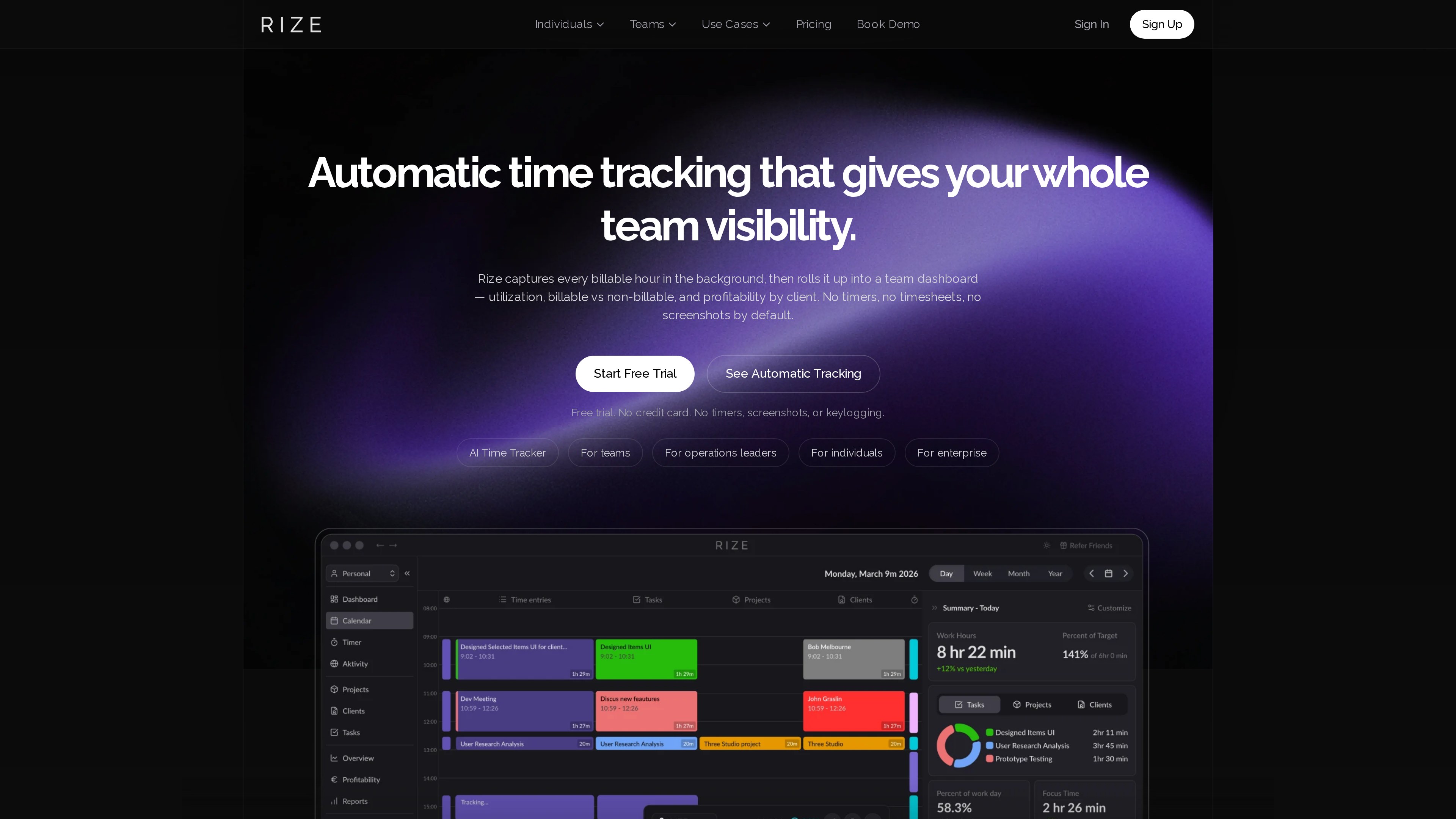
The homepage screenshot above (2026-10-01) shows the desktop app demo: navigation for Dashboard, Calendar, Projects and Clients on the left, a color-coded project timeline of the day in the middle, and a summary panel with work hours, target completion and focus time on the right.
At a Glance
| Item | Details |
|---|---|
| URL | https://rize.io/ |
| Type | Automatic time tracking and work analytics (SaaS, desktop app) |
| Cost | No permanent free tier; 7-day full-access trial (no credit card); individual plans 29.99/seat/month billed yearly (pricing, as of 2026-10-01) |
| Sign-up | Account and desktop app required |
| Interface language | English (no official localized versions observed as of 2026-10-01) |
| Clients | macOS 10.14.6+ and Windows 10+; Linux "coming soon"; mobile app only on Enterprise |
| Launched | Founded September 2020; Product Hunt launch May 2021 (About page) |
Background
- Founders: Rize was founded in San Francisco in September 2020 by Macgill Davis and Will Goto. The two met as engineers at Peer (later acquired by Twitter) and worked at Twitter and Periscope; their previous company, the management-tool startup Humble Dot, raised $3.1M and shut down after three years without product-market fit (About page, Failory interview).
- Getting started: after shutting Humble Dot down, they interviewed engineers about their biggest work frustrations — "not knowing where my time goes" came up most, so they built automatic time tracking. Rize hit #1 on Product Hunt in May 2021 and passed $11k in monthly revenue about six months after launch (About page, Indie Hackers AMA).
- How it's run: the company has been bootstrapped from day one, reports being profitable since 2022, and has served more than 20,000 paying customers with a small remote-first team (About page, as of 2026-10-01).
Key Features
- Automatic capture: the desktop app records foreground apps, website URLs, documents and meetings in the background; with the Google Calendar integration, meeting time counts even when the call window isn't in focus (pricing FAQ).
- AI categorization and finalization: sessions are assigned to clients, projects and categories, then finalized into timeline entries automatically — users review exceptions rather than approving drafts line by line, which the company highlights as its key difference from Timely and Memtime (About page).
- Focus and wellness tools: focus music, smart break reminders, focus-time and work-habit analytics, and an AI chat for querying your data (pricing).
- Team and profitability reporting: manager dashboards show utilization, billable vs non-billable splits and margin per client and project; client-ready reports export as PDF/CSV. The stated target customers are agencies of 3–200 people, accounting firms of 20–100 staff, and consultancies (About page).
- Integrations and openness: ClickUp, Linear, Asana, Notion, Jira, Monday.com, Google Calendar, Outlook and more; from Pro upwards, API, webhooks, Zapier and an MCP server let AI assistants like Claude and ChatGPT query time data directly (About page, pricing).
Privacy Design (Official Commitments)
Privacy is Rize's headline selling point. The following are explicit commitments on the website (homepage FAQ, pricing FAQ, checked 2026-10-01):
- By default it does not take screenshots, log keystrokes, track mouse movement or store any screen images; it reads only window metadata (app name, window title, URL) for categorization.
- The optional "Screen Text" feature requires opt-in by both the organization and the individual, and only that person can read what it captures.
- Employees control what is shared: only entries explicitly tagged to a team project or client are visible to admins; personal browsing and non-work activity is never shared; entries can be edited or deleted.
- Data is hosted on AWS, encrypted at rest and in transit, with database backups at least twice a day.
Pricing (as of 2026-10-01)
Prices below are from the pricing page (Individual + Annual view); monthly billing costs more, and the FAQ states monthly prices start at $12.99 with annual billing saving up to 25%:
| Plan | Effective monthly (annual) | AI credits | Highlights |
|---|---|---|---|
| Basic | $9.99 | 500/mo | Automatic tracking, AI categorization & tagging, AI chat, focus insights, focus music & smart breaks, personal reports, exports |
| Pro | $23.99 | 1,000/mo | Adds client & scheduled reports (PDF/CSV), AI efficiency dashboard, AI automations & agents, MCP server, API/Webhooks/Zapier |
| Max | $39.99 | 3,000/mo | Highest AI credit allotment, priority support |
| Team | 39.99 monthly) | — | Shared dashboards, admin controls and team sync (per FAQ) |
| Enterprise | Custom | — | Mobile app, SOC 2, SSO/SCIM, custom contracts & SLA, dedicated account manager |
Notes: the three individual tiers differ only in AI credit allotment; the 7-day trial needs no credit card; after cancelling you keep the account and can export history, but no new activity is tracked (pricing FAQ).
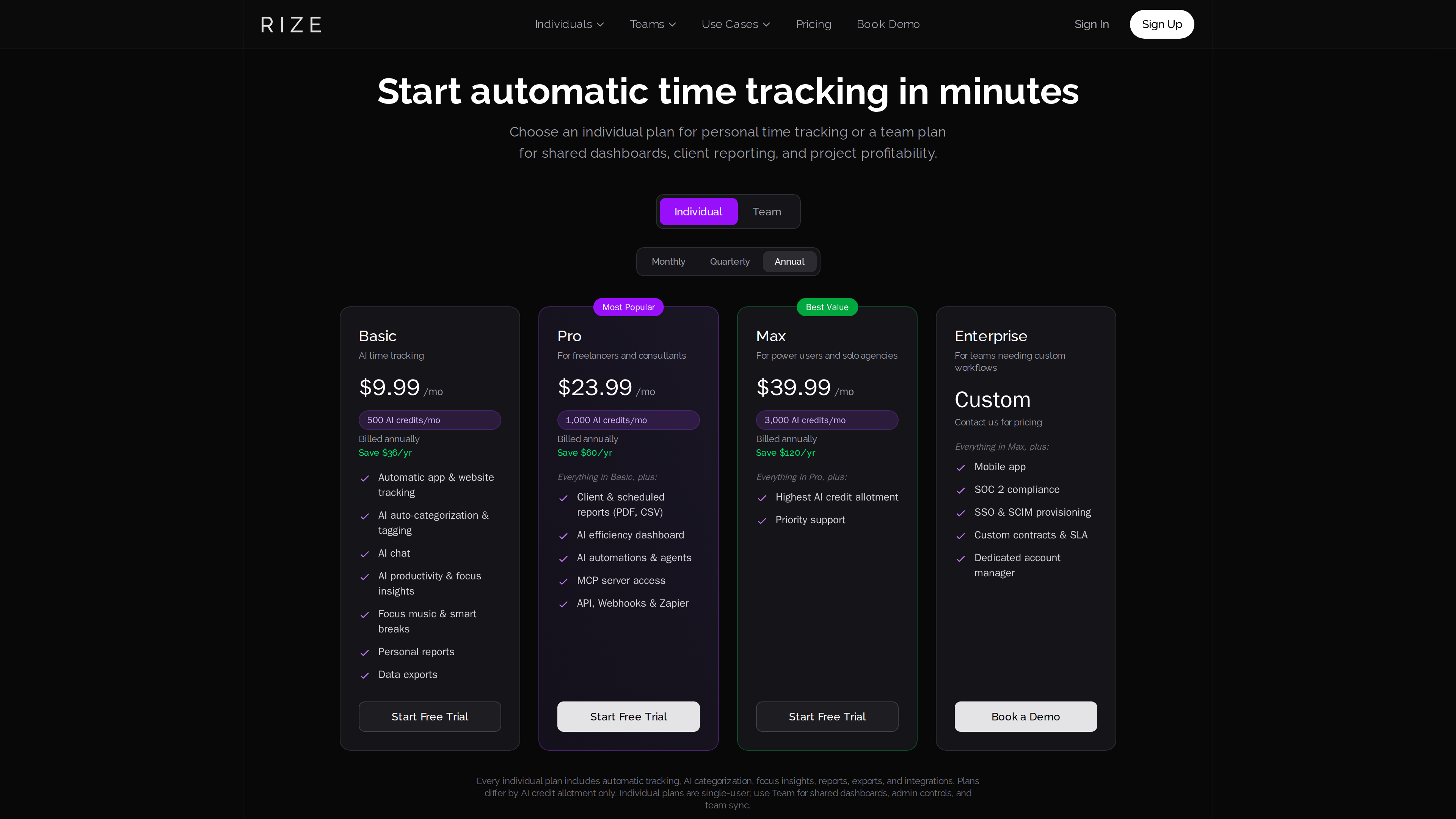
The pricing page screenshot above (2026-10-01) shows the four cards with their AI credit allotments; the page notes individual plans differ only by credits, while shared team dashboards require a Team plan.
Who It's For
- Freelancers, agencies and professional-services firms that bill by the hour and need accurate timesheets and profitability reports.
- Individual knowledge workers who want to quantify where their time goes and build better focus habits.
- Teams that dislike screenshot-style monitoring and want employees to keep control of their own data.
Limitations
- No permanent free tier: after 7 days it is paid-only, and the entry price is above free alternatives like Toggl's free plan.
- Desktop-only tracking: Linux is not yet supported, phone usage is not covered (mobile app is Enterprise-only), and time away from the computer goes unrecorded.
- English-only interface (observed as of 2026-10-01).
- AI credit system: AI categorization and chat consume monthly credits, so heavy use may push you to a higher tier.
- Automatic tracking means continuous collection of window metadata — no screenshots or keystrokes, but users uncomfortable with that class of data should read the privacy policy first.