Plane (plane.so) is an open-source project management and issue-tracking platform developed by Plane Software, Inc. Its core repository is published on GitHub under the AGPL-3.0 license (makeplane/plane, about 60,217 stars as of 2026-10-01), and the repository description states its positioning directly: "Open-source Jira, Linear, Monday, and ClickUp alternative." Unlike SaaS-only competitors, Plane ships in three forms — an official hosted cloud, Docker/Kubernetes self-hosting, and a fully offline air-gapped edition — which is the main reason teams with data-residency requirements adopt it (homepage, self-hosted page, checked 2026-10-01).
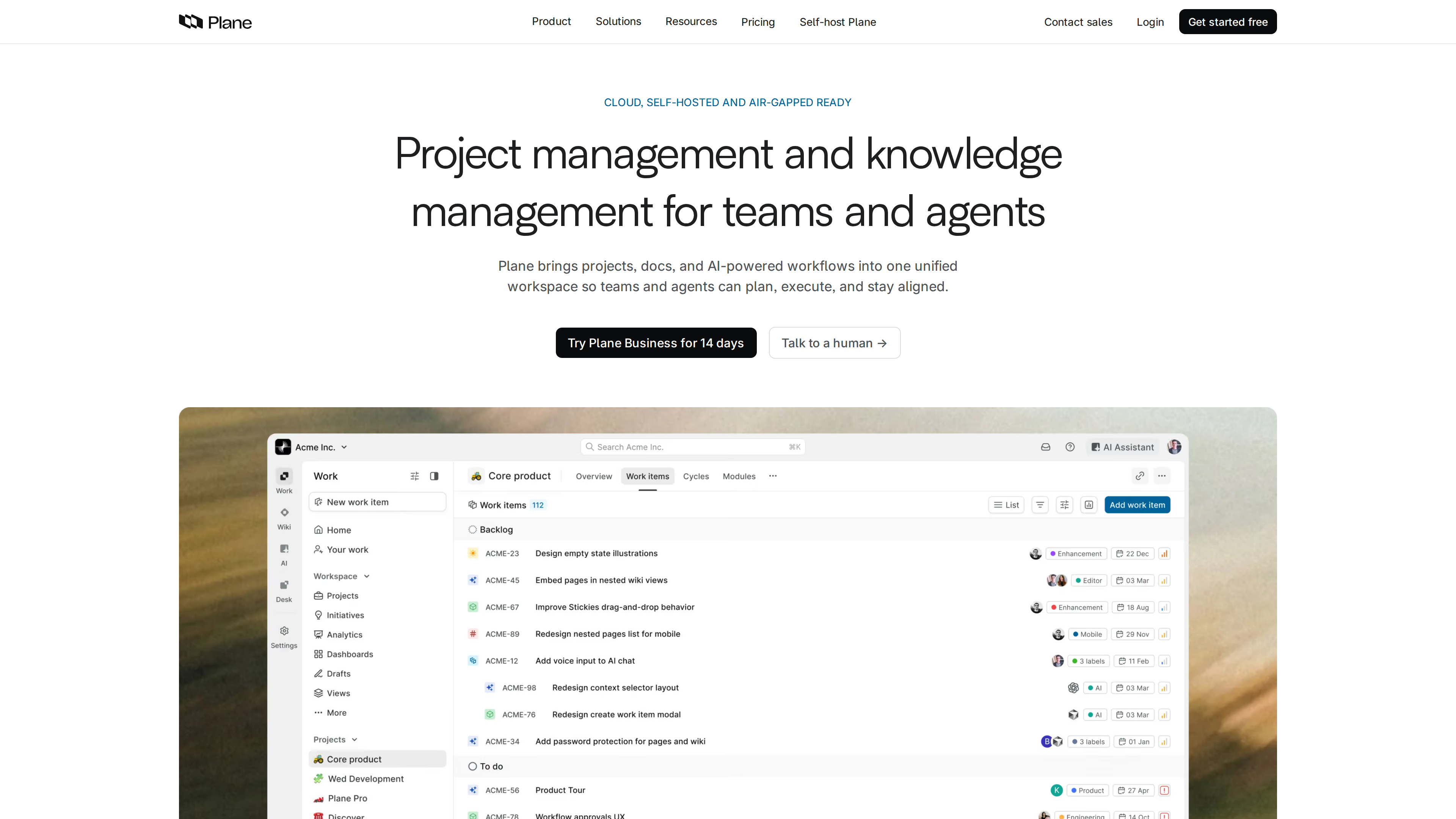
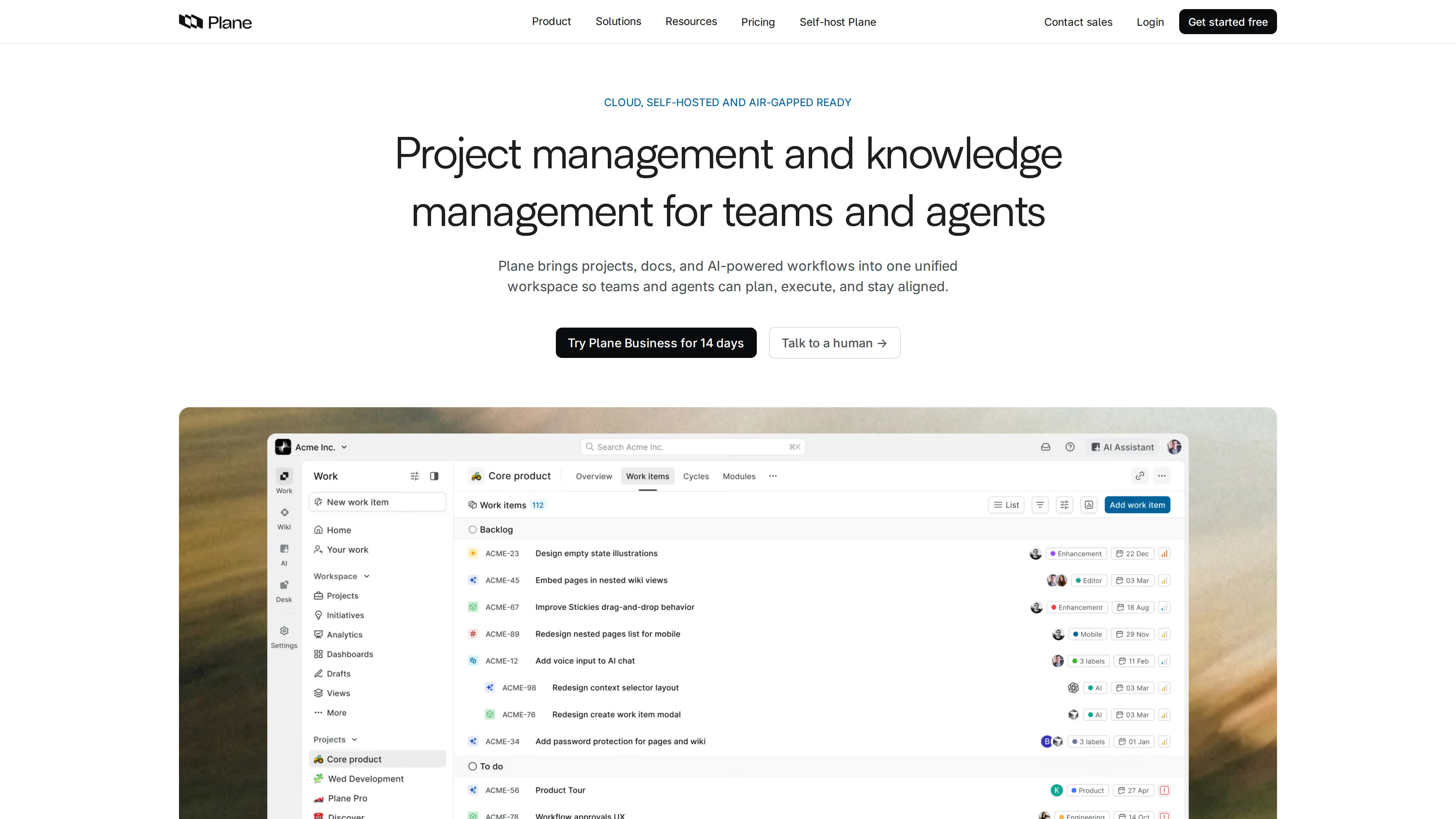
The screenshot above shows the homepage: the hero headline "Project management and knowledge management for teams and agents" with the tag "Cloud, self-hosted and air-gapped ready", followed by the app's work-item list view. The left sidebar exposes the four product areas — Work, Wiki, AI, and Desk.
At a glance
| Item | Details |
|---|---|
| URL | https://plane.so/ |
| Type | Open-source project management and issue tracking (cloud + self-hosted) |
| Pricing | Cloud Free tier 8/seat/month (15/seat/month ($13 annually); Enterprise Grid by quote (pricing page, as of 2026-10-01) |
| License | Community Edition under AGPL-3.0; separate Commercial and Airgapped editions (see below) |
| Sign-up | Cloud account required (sign up at app.plane.so); 14-day free trial for Pro/Business; self-hosting the Community Edition needs no vendor account |
| UI languages | 21 built-in interface languages including English, Simplified and Traditional Chinese, Japanese, Korean, French, German, Spanish and Russian (i18n language constants, checked 2026-10-01); the marketing website is English-only |
| Platforms | Web, macOS, Windows, Linux desktop apps, and iOS/Android mobile apps (official download page) |
Background
- Operated by Plane Software, Inc.; the site's structured data lists a founding date of 2022 and headquarters in San Francisco, California, US (homepage JSON-LD).
- The GitHub repository was created on 2022-11-19. The official About page describes an "open-source debut" in 2023 — "issue tracking, cycles, and project workflows became open source" — and says the open-source community has helped shape Plane since 2023 (About page).
- Repository activity: the most recent push was on 2026-10-01. The latest Community Edition release is v1.4.2 (2026-08-23), with several other releases in August 2026 alone, indicating a steady release cadence (GitHub releases).
- Versioning caveat: the documentation states that each edition is built on a distinct codebase with its own release cycle. Cloud ships first; the commercial self-hosted changelog reached v3.3.0 on 2026-09-24, which is not the same version line as the Community Edition's v1.x (Plane Editions docs).
- The homepage claims "Two Fortune 10 companies chose Plane for their Jira migration", the pricing page says "Join 50,000+ teams", and the company claims SOC 2, ISO 27001, GDPR, and CCPA compliance. All of these are vendor statements (homepage, pricing page).
Core capabilities: work items, cycles, wiki, and AI
- Work items (formerly issues): rich-text descriptions, sub-items, custom states and properties, comments with @mentions. Five layouts — list, board, calendar, Gantt, and spreadsheet — with saved, shareable views (pricing feature table, GitHub README).
- Cycles and modules: time-boxed iterations with built-in burndown charts and velocity tracking; modules group repeatable blocks of work with their own leads (GitHub README).
- Pages and Wiki: real-time collaborative docs inside projects, with work-item embeds and public publishing; the Wiki targets company-wide knowledge (Pro tier and up). A September 2026 cloud update also lets users edit attached Word/Excel/PowerPoint files directly from Pages (changelog).
- Intake and customers: collect external requests in-app, via public forms, or through a dedicated email address, and triage them into work items; the Business tier adds customer profiles linked to work items (pricing feature table).
- Initiatives, dashboards, and workflows: initiatives roll multiple projects up to org-level goals; auto-generated dashboards track cycle velocity and workload; the Business tier controls a single workflow, while Enterprise Grid supports multiple workflows with approvals (pricing feature table).
- Plane AI: per-seat monthly AI credits (500 on Pro, 1000 on Business), cross-workspace Q&A, built-in agents that can be assigned work, and a Slack integration; self-hosted instances can bring their own OpenAI/Anthropic/AWS Bedrock/Ollama keys (pricing page, self-hosted page).
- Importers and integrations: built-in importers for Jira, Linear, Asana, ClickUp, CSV, Confluence, and Notion; integrations for GitHub (including Enterprise Server), GitLab, Slack, Sentry, and Draw.io; a REST API with OAuth 2.0, webhooks, Node.js/Python SDKs, and an official MCP server (pricing feature table, homepage).
Cloud pricing (as of 2026-10-01)
Prices taken from the pricing page and its page data; billed per seat:
| Plan | Monthly | Annual (per month) | Highlights |
|---|---|---|---|
| Free | $0 | — | Core project management: work items, cycles/modules, five layouts and views, intake, estimates, project pages; capped at 12 users |
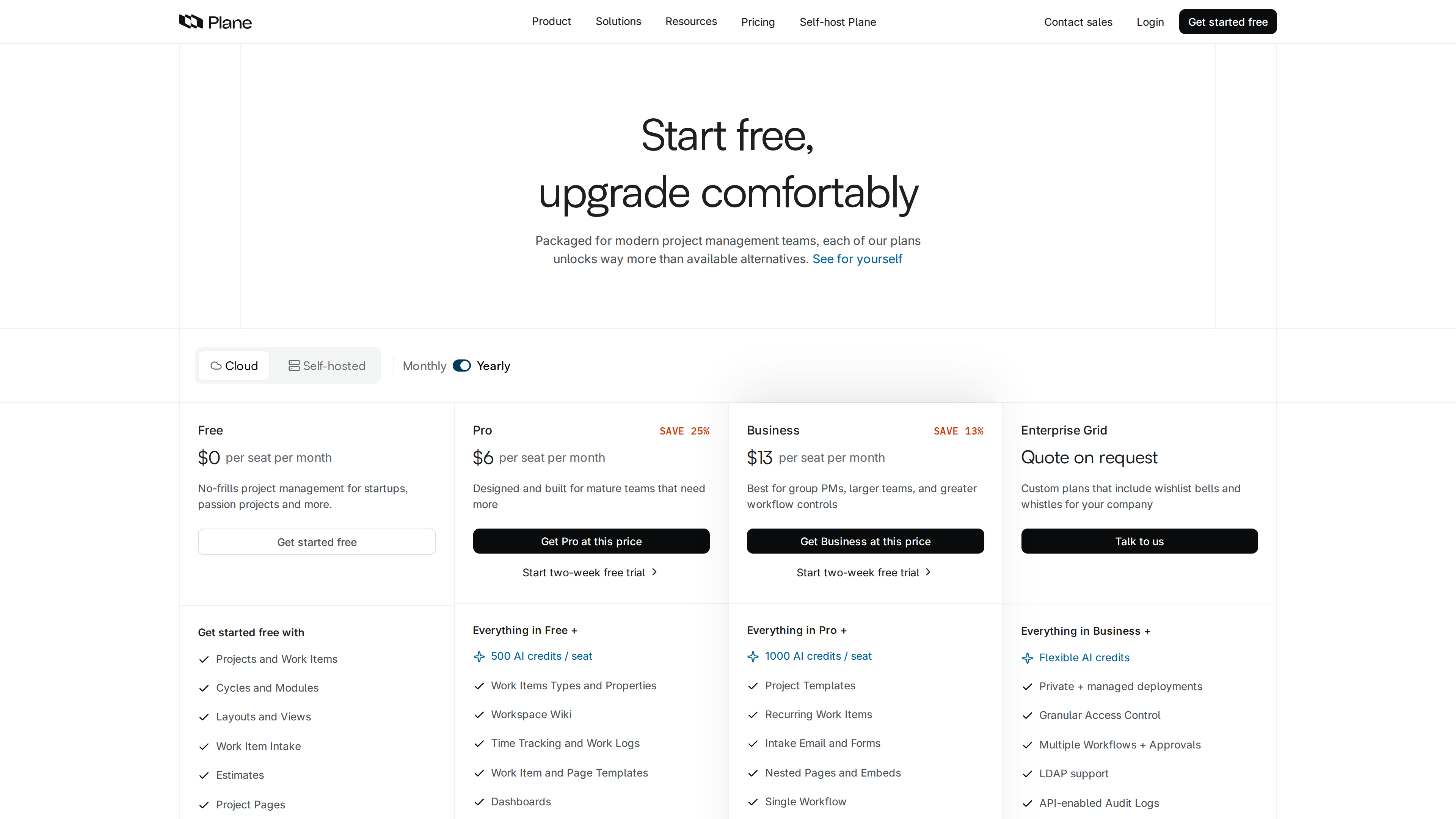
| Pro | $8 | $6 (labeled "Save 25%") | Everything in Free + 500 AI credits/seat/month, custom work-item types and properties, workspace Wiki, time tracking, templates, dashboards, initiatives, teamspaces, integrations + marketplace, 1:5 guests |
| Business | $15 | $13 (labeled "Save 13%") | Everything in Pro + 1000 AI credits/seat/month, project templates, recurring work items, intake email and forms, nested pages, single workflow, customers, advanced dashboard widgets |
| Enterprise Grid | Quote | Quote | Everything in Business + flexible AI credits, private managed deployments, granular access control, multiple workflows + approvals, LDAP, API-enabled audit logs, migration services |
Pro and Business both offer a 14-day free trial.
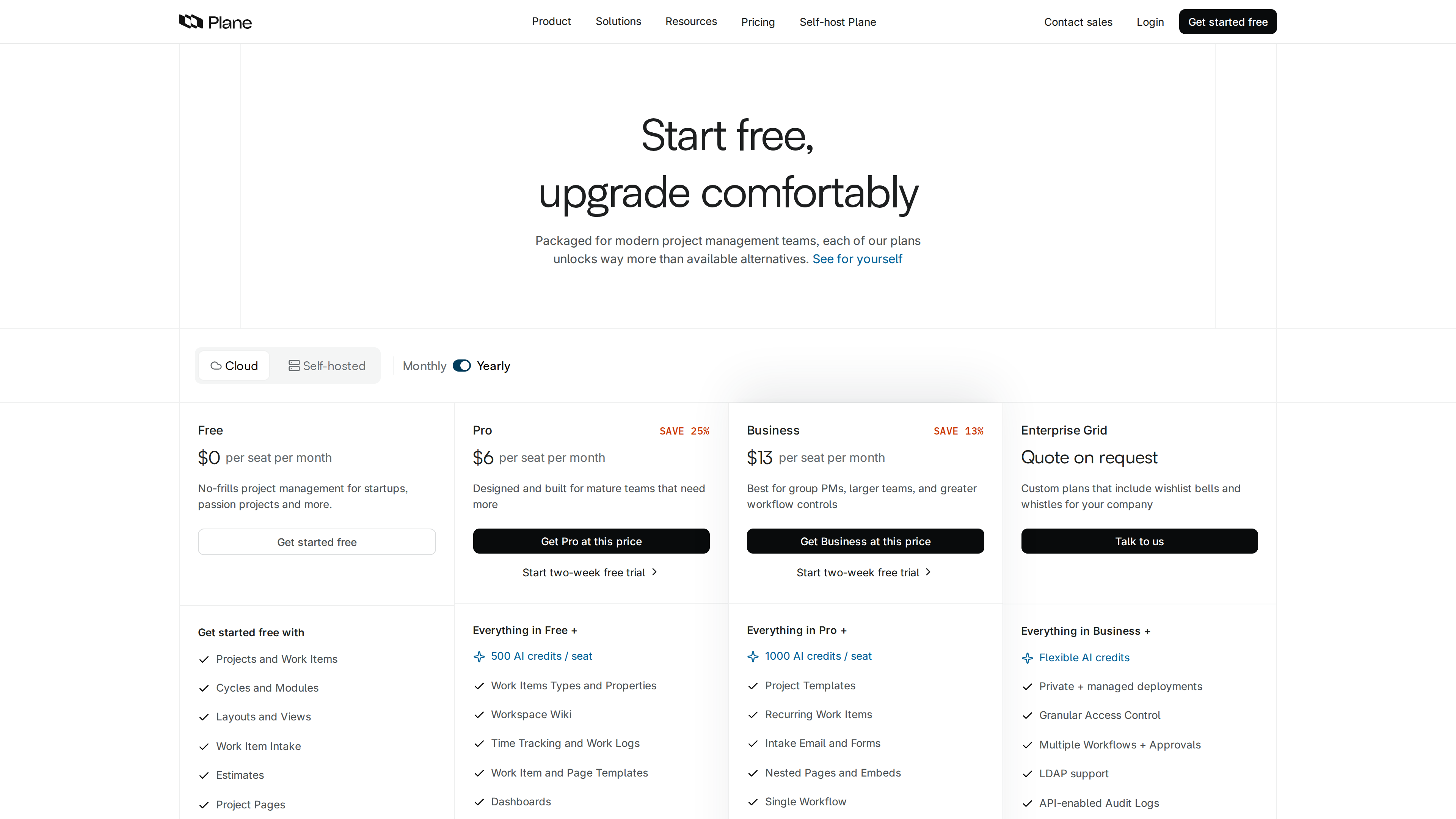
The screenshot above shows the cloud plans with yearly billing selected: Free 6/seat/month, Business $13/seat/month, and Enterprise Grid by quote, with the main feature differences listed under each plan.
Self-hosting and editions: the AGPL Community Edition is the free tier; paid features live in the Commercial Edition
This is the most commonly misunderstood part of evaluating Plane. The official documentation defines four editions (Plane Editions docs, checked 2026-10-01):
- Cloud: the hosted edition run by the company.
- Community Edition: the open-source GitHub repository, AGPL-3.0 licensed, free to self-host, with feature availability on par with the cloud Free tier. The docs state it has "no code dependencies or restrictions on and from the Commercial Edition" — but upgrading to a paid plan requires switching to the Commercial Edition first.
- Commercial Edition: the recommended self-hosted edition. It starts on a free plan (12 seats per workspace, no license key required) and unlocks paid features once a Pro/Business/Enterprise Grid license is applied. Its code is not public: there is no public enterprise repository under the makeplane organization and no
eedirectory in the main repo, consistent with the documented "distinct codebase per edition" model. - Airgapped Edition: the full Commercial feature set delivered for isolated networks — signed offline bundles, license-file activation, and zero telemetry.
Deployment options include Docker Compose (one-command install via Prime CLI; the docs list a minimum of 2 CPU cores and 4 GB RAM, 8 GB recommended for production — the marketing page separately states "4 CPU cores, 8 GB RAM, 50 GB storage", and the two figures do not match), Kubernetes via Helm charts, Docker Swarm, a single-container all-in-one image (evaluation only), Podman Quadlets, Coolify/Portainer, and an AWS Marketplace listing; the Community Edition can also be installed directly with the setup.sh script from GitHub releases (Docker Compose docs, self-hosted page). Instance-level administration happens in the God Mode panel (SMTP, authentication, SSO, telemetry toggle). Self-hosted AI requires your own model keys, and semantic search additionally requires OpenSearch.
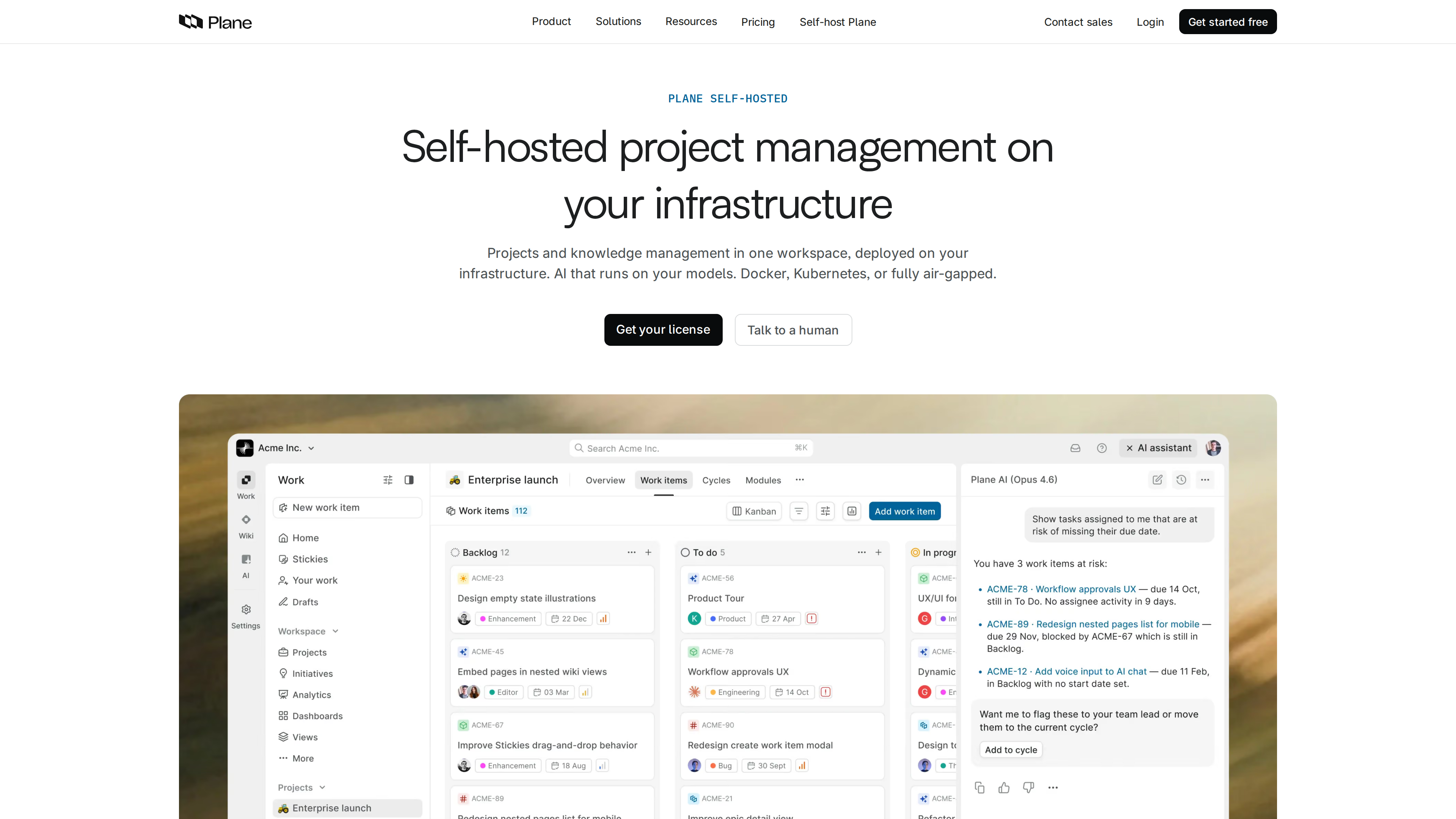
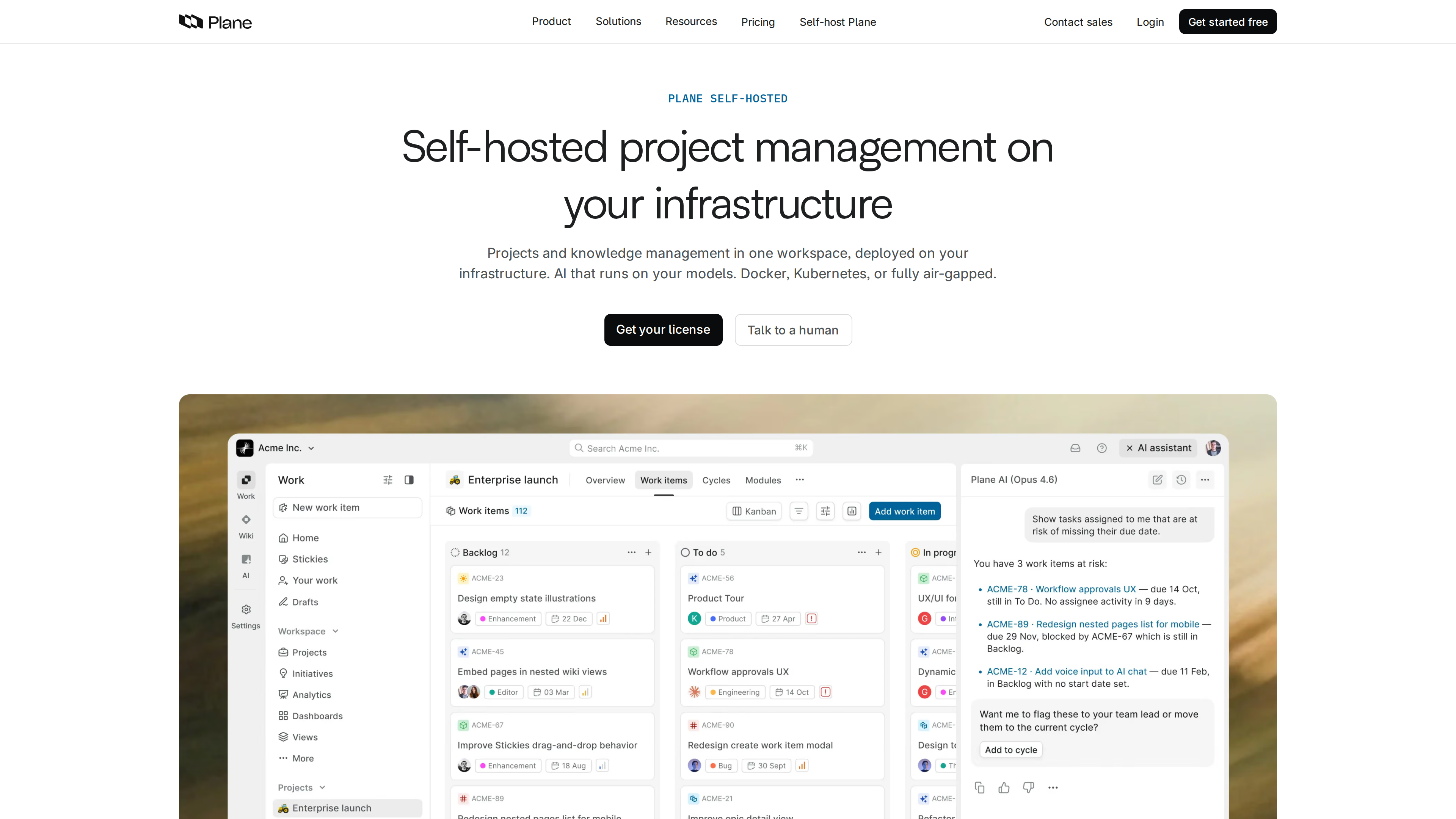
The screenshot above shows the self-hosted page, which emphasizes Docker, Kubernetes, or fully air-gapped deployment and "AI that runs on your models"; the app preview shows a board layout with the Plane AI panel on the right.
Accounts and extensibility
- Sign-up: cloud accounts are created at app.plane.so. Self-hosted instances are managed by the instance admin and support Google/GitHub OAuth, OIDC, SAML, and LDAP (some of these are Commercial Edition features) (self-hosting docs).
- API and extensions: REST API with OAuth 2.0, HMAC-signed webhooks, typed Node.js and Python SDKs, and an official MCP server (makeplane/plane-mcp-server, MIT license) that lets external AI clients operate Plane. Plane Compose adds Projects-as-Code, defining project configuration in YAML (homepage).
- UI languages: the open-source repo ships 21 interface languages (including Simplified and Traditional Chinese), applied per user (i18n language constants).
- Mobile: iOS and Android apps are offered on the site and can connect to self-hosted instances (self-hosted page).
Who it suits
- Teams on Jira, Linear, Monday, or ClickUp that want a self-hostable, auditable open-source alternative (with matching importers built in).
- Organizations with data-residency, compliance, or isolated-network requirements (finance, government, healthcare, defense) that need air-gapped deployment.
- Small teams starting free: the cloud Free tier covers up to 12 users, and the self-hosted Community Edition has no seat cap at the same feature level.
- Technical teams that want AI agents wired into project workflows (MCP, the Slack agent, bring-your-own model keys).
Limitations
- A clear boundary between free/open and paid features: dashboards, initiatives, workspace Wiki, time tracking, workflow approvals, LDAP, and audit logs are all paid-tier features. The Community Edition matches the cloud Free tier only and cannot be upgraded to a paid plan in place — you must migrate to the Commercial Edition (Plane Editions docs).
- AGPL-3.0 obligations: offering network services based on the Community Edition triggers AGPL source-disclosure obligations; commercial SaaS reuse needs your own compliance assessment.
- Fragmented version lines: cloud, Commercial, and Community editions are distinct codebases on separate release cycles. New features typically land on cloud first, and version numbers are not comparable across editions (as of 2026-10-01: Community v1.4.2 vs. commercial self-hosted changelog v3.3.0).
- The cloud Free tier is capped at 12 users (pricing page).
- Compliance and scale claims are vendor-stated: the SOC 2/ISO 27001 certifications, "Fortune 10 customers", and "50,000+ teams" come with no third-party verification linked on the site, and the self-hosted page's star count (48,000+) lags well behind the actual figure (about 60,000).
- Unclear mobile maintenance status: the open-source plane-mobile repository has had no updates since July 2024, while the website still offers mobile app downloads; the relationship between the two is not explained (makeplane/plane-mobile).
- Desk (the support product) is not yet available, labeled "Coming soon" (homepage, as of 2026-10-01).
Comparable tools
Plane positions itself as an open-source alternative to Jira, Linear, Monday, and ClickUp and maintains plane-vs-jira, plane-vs-linear and similar comparison pages — all vendor-authored (site). Within open-source project management, Plane sits near OpenProject and Taiga; its distinguishing traits are the three parallel distribution lines (official cloud, commercial self-hosted, air-gapped) and built-in importers from the mainstream commercial tools.